Why Email Goes to Spam Even When SPF, DKIM and DMARC Pass
An SPF, DKIM or DMARC pass answers a question about authenticated sending identity. It does not tell you whether a mailbox provider chose the Inbox, Spam folder or another handling outcome.
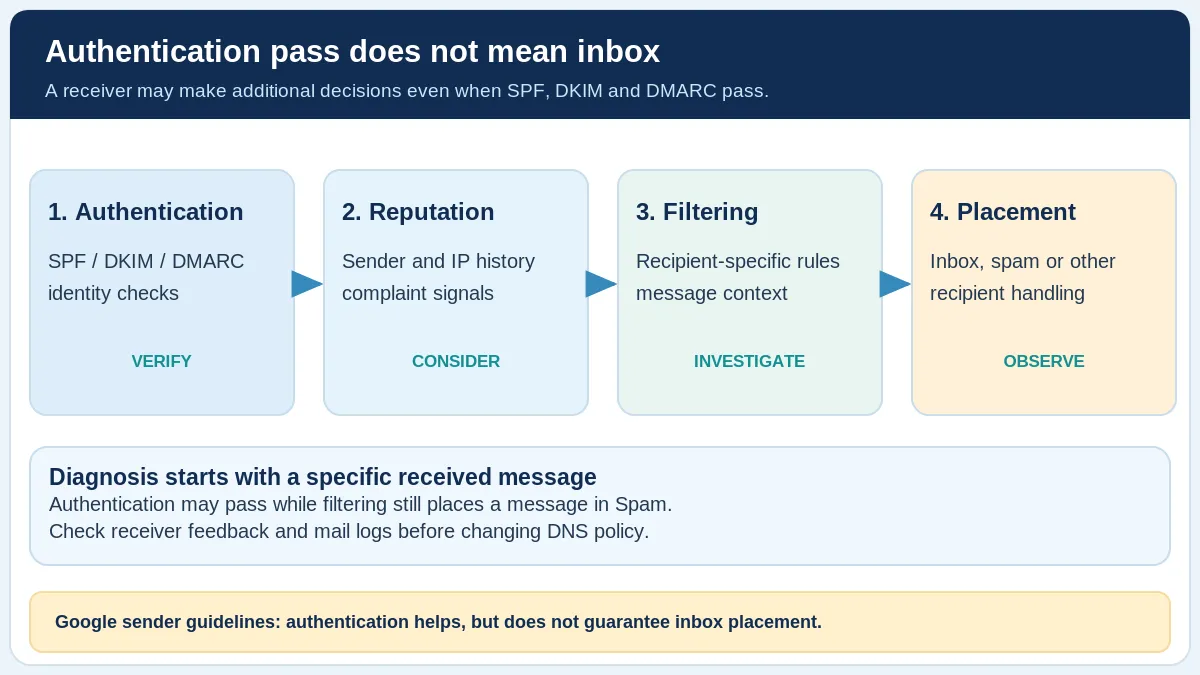
Conceptual delivery pipeline. The sequence summarizes distinct diagnostic questions; it is not a diagram of a particular mailbox provider’s internal filtering algorithm.
In brief
An SPF, DKIM or DMARC pass answers a question about authenticated sending identity. It does not tell you whether a mailbox provider chose the Inbox, Spam folder or another handling outcome.
The worked examples on this page are explanatory, not results from your domain or a mailbox-provider test.
What a pass actually establishes
SPF verifies whether a sending IP is authorized for the evaluated SMTP identity. DKIM cryptographically validates signed message material and a signing-domain identity. DMARC evaluates alignment of qualifying SPF or DKIM results with the visible From domain. These mechanisms address authorization and identity, not guaranteed inbox placement.
A domain may publish SPF, DKIM and DMARC records while some actual messages fail. Conversely, a specific message can pass all three and still be filtered. The technical claims are separate and should never be combined into a synthetic “deliverability score.” See RFC 9989 and RFC 6376.
Why providers may still filter the message
Providers use additional filtering rules and sending-practice signals. Google’s email sender guidelines cover authentication, complaint rates, DNS, TLS, message format and subscription management. Compliance with the authentication portion is not a guarantee of inbox placement.
Other potential areas to investigate include whether recipients expected the mail, recent complaint trends, sending consistency, message type and whether the account or system was abused. None of these is confirmed as the cause merely because one message landed in Spam.
Yahoo also documents authentication, complaint rates, DNS and unsubscribe expectations for relevant sender categories. Its requirements are not identical to Gmail’s for every sender or mailing type.
Use evidence instead of guessing at the cause
Start with the received message’s full headers to identify Authentication-Results claims and the server making each claim. RFC 8601 notes that a header’s presence does not prove its assertions are trustworthy; receiver trust context matters.
Next, compare actual sending logs and any SMTP rejection or delay notices with provider feedback. An accepted message is not automatically an inbox message. If a seed test is available, interpret it as a sample of participating test mailboxes, not a measurement of your entire list.
For Gmail traffic, examine available Postmaster Tools information where volume permits, rather than inventing a universal reputation threshold. Do not change DMARC from monitoring to rejection solely because mail is going to spam.
Which evidence helps diagnose authenticated mail in Spam?
This reference separates evidence from interpretation. It is general guidance, not the result of a live check of your domain.
| Evidence | Question it answers | Limitation |
|---|---|---|
Receiver Authentication-Results | What a particular server reports about SPF/DKIM/DMARC | Requires a trustworthy reporting context; not a folder verdict |
| Sending service delivery log | Was the SMTP handoff accepted, deferred or rejected? | Acceptance is not inbox placement |
| Provider postmaster feedback | What aggregate sending signals are available? | Not per-message folder placement; may depend on volume |
| Seed mailbox sample | Where did controlled sample messages appear? | May not represent real recipients |
When researching a particular incident, record the time, sending service, message type, reporting receiver and any known SMTP response. Compare like with like; an authentication header from a different message cannot verify the reported placement of the missing message.
Start a structured investigation
Use the Email Health Assessment to combine optional public DNS checks with local reported message evidence and bounce notices. Use the Email Header Analyzer to inspect a specific received message. Where you have two samples, the Authentication Comparison tool keeps the reporting-server context visible.
Avoid changing authentication policy until you know which legitimate systems send your mail. For rejected mail, first read the actual SMTP response and then choose targeted next steps.
Common questions
Can a DMARC pass guarantee the inbox?
No. It is an authentication and alignment result, not a recipient-folder verdict.
Should I immediately change my SPF record?
Not without a diagnosed SPF authorization problem and an inventory of the legitimate SMTP sending systems.
Primary sources and fact-check
Reviewed October 20, 2026 against the specifications and provider documentation below. Provider products, interfaces, and requirements can change; check the official source before making a production DNS or mailing decision.