How to Read a DMARC Aggregate Report (XML Guide)
A DMARC aggregate report is receiver-supplied evidence about a group of messages claiming your domain. It helps identify sending sources and alignment patterns, but it is not a list of every delivered message or a guarantee that mail reached the inbox.
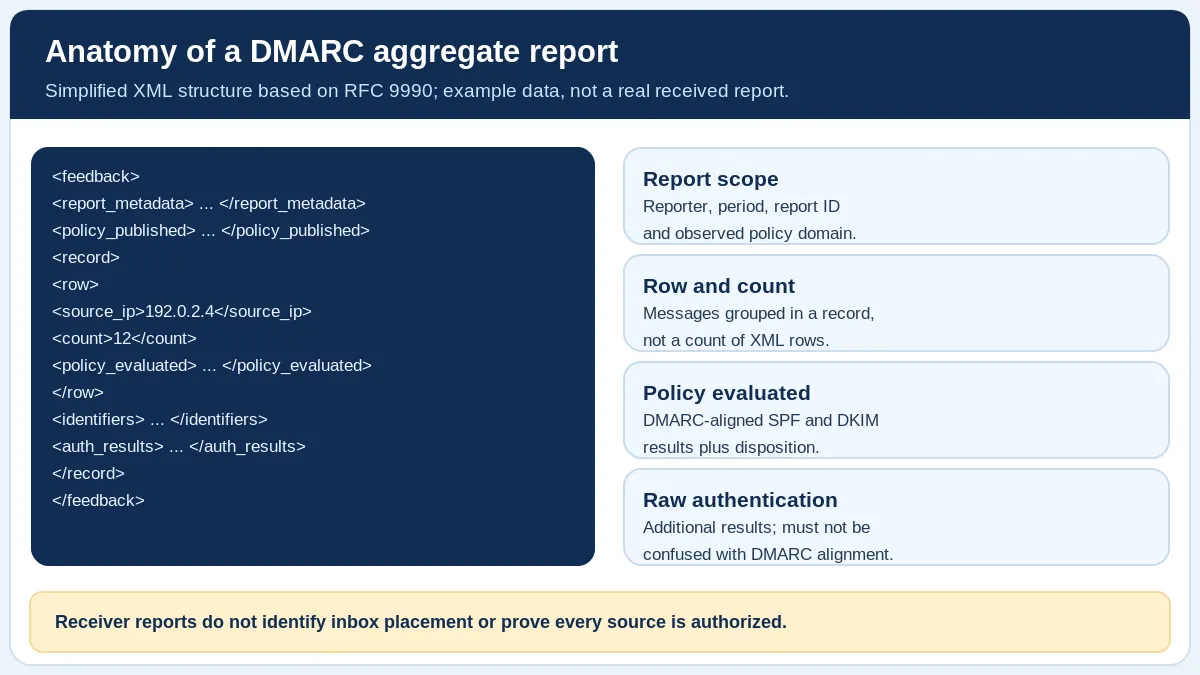
Schematic XML field guide based on RFC 9990. The example IP is a documentation address; this image does not represent a real report.
In brief
A DMARC aggregate report is receiver-supplied evidence about a group of messages claiming your domain. It helps identify sending sources and alignment patterns, but it is not a list of every delivered message or a guarantee that mail reached the inbox.
The worked examples on this page are explanatory, not results from your domain or a mailbox-provider test.
Identify the reporting scope
RFC 9990 defines the aggregate report format and its main XML fields. Begin with report_metadata to understand who reported, the report identifier and the covered period. Then inspect policy_published for the domain and policy being described.
Keep reports for distinct policy domains separate. A report produced by one receiver is not proof of what every other receiver observed. Aggregate periods and reporting coverage also vary.
record is not necessarily one email. The row/count field gives the number of messages the receiving system grouped into that record. Never total the XML elements as if each represented one message.Read the record without mixing fields
Within each record, row/source_ip identifies a source IP reported by the receiver, while row/count is the number of messages in that record. For totals, use the counts, not the number of XML record elements.
row/policy_evaluated/spf and row/policy_evaluated/dkim describe the receiver’s DMARC alignment evaluation. The values under auth_results describe underlying authentication checks, which may pass for a different domain. A raw SPF pass is therefore not automatically an aligned SPF pass.
policy_evaluated/disposition records the reported policy application. It is not an inbox-placement field. For example, none does not establish that a message was delivered to the Inbox or even seen by a person.
What does a source IP mean?
A source IP identifies the connection the receiver reported. It does not, by itself, prove the IP belongs to an attacker, your own server or a compromised account. Cross-reference documented legitimate sending services and logs before making a judgment.
If a report lists ten rows, do not say there were ten messages. One row may summarize hundreds of messages; another may summarize only one. Keep recipient-specific delivery logs and message-level evidence separate from this aggregate view.
DMARC aggregate XML field reference
This reference separates evidence from interpretation. It is general guidance, not the result of a live check of your domain.
| XML field | What it describes | What it cannot prove |
|---|---|---|
report_metadata | Reporter, covered period, report identifier | Complete coverage across all receivers |
policy_published | Domain and policy observed by receiver | Current DNS is identical to past report |
row/count | Messages grouped in that row | Number of XML records |
policy_evaluated | Applied disposition and DMARC alignment results | Inbox placement or sending-source legitimacy |
auth_results | Reported SPF/DKIM authentication details | Automatic alignment with the visible From domain |
To investigate a source, compare the reported source_ip, the relevant identifiers and your approved sending services. Remember that aggregate reporting describes what a reporting receiver observed, not what every receiver saw.
Safely investigate a reported failure
First confirm the header_from domain and published policy. Next, look at evaluated alignment and authentication results. Then review known sending services, DKIM signing domains, envelope domains and the reporting period.
Use the DMARC Report Analyzer to process XML, GZIP or ZIP locally. Its counts remain receiver-reported estimates of traffic represented by the file, not independent proof of delivery. Consult the Email Health Assessment for evidence-led next steps if messages are bouncing or missing.
Common questions
Does DMARC disposition “none” mean delivered?
No. That is a reported DMARC policy disposition, not confirmation of inbox placement or recipient action.
Why can SPF show pass but DMARC SPF alignment fail?
SPF can validate a different SMTP identity. DMARC evaluates whether an authenticated identifier aligns with the visible From domain.
Primary sources and fact-check
Reviewed October 20, 2026 against the specifications and provider documentation below. Provider products, interfaces, and requirements can change; check the official source before making a production DNS or mailing decision.