How to Read Email Headers for SPF, DKIM and DMARC
A received message header records multiple pieces of transport and authentication information. Reading the right fields can narrow an investigation, but a pasted header is not independent proof that every claim inside it is valid.
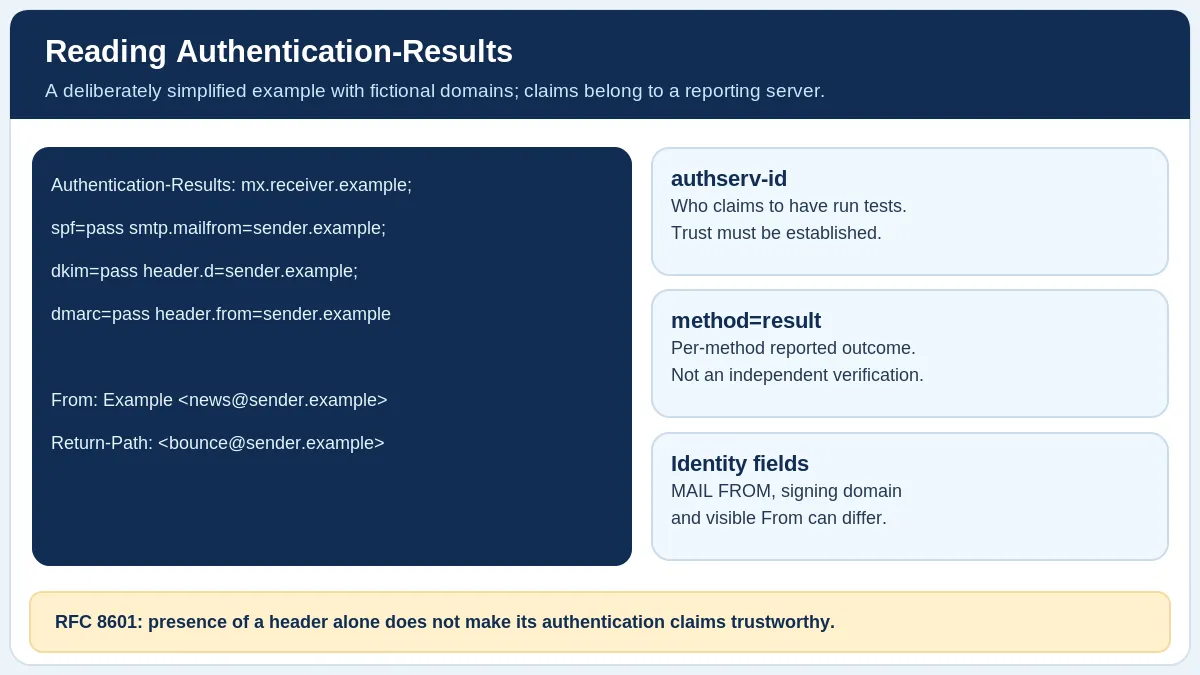
Fictional header illustration, not a provider-specific message. Treat Authentication-Results as claims unless you can establish the receiver’s trust boundary (RFC 8601).
In brief
A received message header records multiple pieces of transport and authentication information. Reading the right fields can narrow an investigation, but a pasted header is not independent proof that every claim inside it is valid.
The worked examples on this page are explanatory, not results from your domain or a mailbox-provider test.
Find the fields relevant to authentication
Look for From, Return-Path, DKIM-Signature, Received and Authentication-Results. The visible From address is a different identity from the SMTP MAIL FROM domain often represented by Return-Path.
The Authentication-Results field can report outcomes such as spf=pass, dkim=pass or dmarc=fail. RFC 8601 defines a reporting service identifier (authserv-id) and individual method claims, which may appear on multiple header lines.
A message may travel through several systems. Treat claims made by different reporting servers as separate reports; do not select one SPF result from one hop and one DKIM result from another to invent a DMARC pass.
Authentication-Results begins with an authentication service identifier. A copied result is only a reported assertion until its origin and trust context are established. RFC 8601.Read a deliberately simplified example
Authentication-Results: inbound.example; spf=pass smtp.mailfrom=bounces.example.com; dkim=pass header.d=example.com; dmarc=pass header.from=example.com is a fictional teaching example, not a real header from Gmail or another provider.
It shows a server claiming that SPF, DKIM and DMARC passed for particular identities. You must still decide whether that server’s authentication assertions are trustworthy within the recipient’s mail system. DKIM passing for a signing domain also does not, by itself, guarantee DMARC alignment.
Common interpretation mistakes
Missing Authentication-Results is unknown, not automatically a failure. An SPF pass for one SMTP identity need not align with the visible From domain. A DKIM signature visible in the header is not the same as a receiver-verified dkim=pass claim.
The Received chain can help with transport investigation, but fields can be forged before the receiver’s trust boundary. RFC 8601 expressly cautions against assuming the contents of an Authentication-Results field are valid merely because it appears in a message.
Authentication header fields at a glance
This reference separates evidence from interpretation. It is general guidance, not the result of a live check of your domain.
| Header property | What it identifies | Caution |
|---|---|---|
authserv-id | Service claiming the authentication results | Its identity alone does not establish trust |
smtp.mailfrom | SMTP envelope identity evaluated for SPF | May differ from the visible From domain |
header.d | DKIM signing domain | Passing DKIM must also align for DMARC |
header.from | Visible From domain relevant to DMARC | Header text alone does not validate a reported pass |
Received | Transport-hop information | Untrusted earlier hops may contain forged fields |
For a real investigation, preserve the complete original headers from a mailbox you control. When redacting data for support, avoid exposing private recipient addresses, message IDs or authentication tokens. Only share what the receiving service or administrator actually needs.
What to do next
Paste a received header into the Email Header Analyzer; analysis stays local to your browser. When comparing before and after messages, use the Email Authentication Comparison tool, which preserves the reporting-service context.
If the message bounced rather than arriving, use the Bounce Error Decoder instead. A bounce notice and an unrelated received header should not be assumed to describe the same delivery attempt.
Common questions
Is “spf=pass” enough for DMARC?
Not necessarily. DMARC also checks identifier alignment with the visible From domain.
Can every Authentication-Results header be trusted?
No. Its reliability depends on which receiving system produced it and the trust boundary described by RFC 8601.
Primary sources and fact-check
Reviewed October 20, 2026 against the specifications and provider documentation below. Provider products, interfaces, and requirements can change; check the official source before making a production DNS or mailing decision.