CRM + Email Integration Without Duplicate Contacts: B2B Sales Team Guide
A RevOps manager connects a new email tool to HubSpot. Five days later: 4,000 duplicate contacts. Sales reps are cold-calling existing clients. The list takes two weeks to clean. The integration had no upsert logic. Three words would have prevented the entire problem.
Key Findings
- 12–15% annual pipeline loss traces directly to incomplete or duplicated CRM data. Bad data is not an IT problem. It is a closed-deal problem.
- Upsert-on-email is the single most important configuration in any CRM integration. Set it before the first sync runs, not after the database is corrupted.
- Role-based addresses (info@, admin@, sales@) generate disproportionate spam complaints and corrupt lead scoring. Remove them from the database before connecting any email platform.
- Native bidirectional integrations capture email activity automatically in the background. Middleware connectors (Zapier, Make) create data gaps when API rate limits are hit.
- Automated workflow emails generate $16.96 per recipient versus $1.94 for standard sends. Clean data is the prerequisite. No deduplication logic means no reliable automation.
How Email and CRM Integrations Corrupt B2B Databases
The most common CRM integration failure is not a technical error. It is a missing default: when a new contact arrives through a sync, the system creates a new record without checking whether that email address already exists. Two reps import the same prospect from different lead sources. The system creates two records. Marketing sees one contact. Sales sees two. Neither attribution path is accurate.
The problem compounds in multi-rep environments. Rep A has a contact stored under one email format. Rep B imports the same person from a different source using a slightly different name format. The CRM creates a second record because the name fields do not match, even though the email address is identical. Without email as the primary deduplication key, name-based matching produces false negatives constantly.
"Our marketing data and our sales data are on different planets. Marketing says 2,000 leads came in from the Q3 campaign. Sales says they only see 800 of them in the pipeline. The other 1,200 are in a different CRM view because of duplicate records created during the import." r/CRM, January 2026 (anecdotal)
Attribution collapses follow. When a prospect exists in two records, campaign performance data splits across both. Email open rates get attributed to one record. Website visits get attributed to the other. The marketing team cannot measure what actually influenced the deal because the data trail is broken at the contact level.
Duplicate contacts also inflate the stored contact count on contact-based email platforms. A database with 3,000 legitimate contacts and 1,500 duplicates bills at 4,500 contacts. The pricing impact is explored in detail in the email platform pricing comparison.
Upsert Logic: The Core Fix for CRM Duplicate Contacts
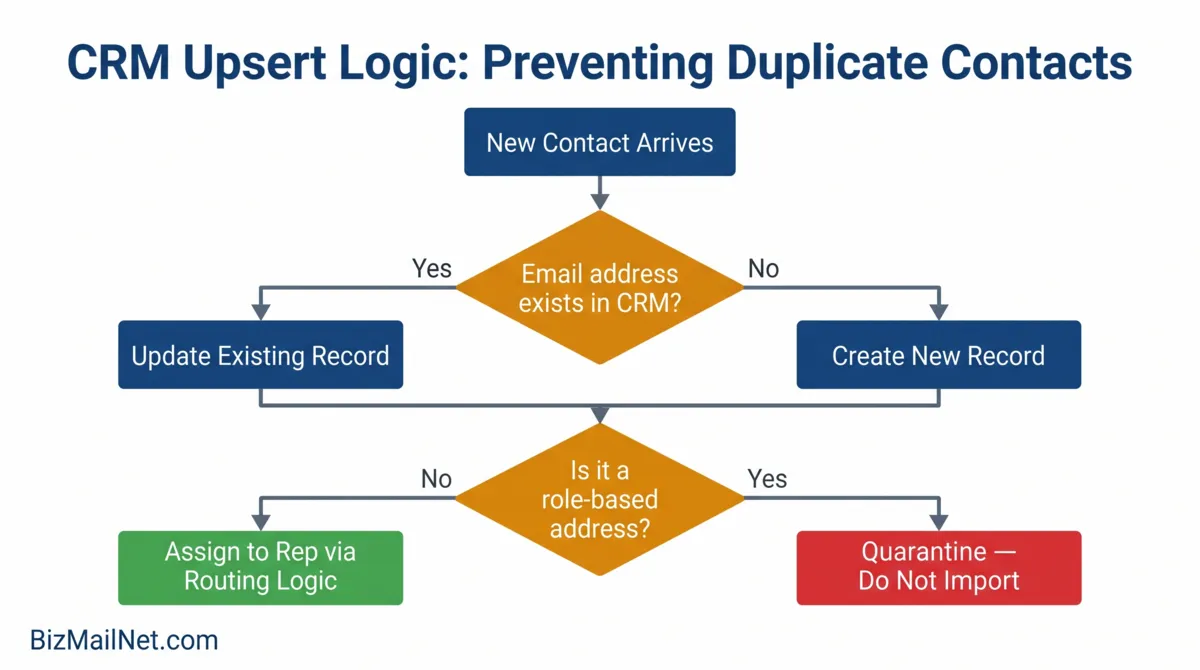
Upsert means: update if exists, insert if not. When a contact arrives through a sync, the integration checks whether an email address matching that contact already exists in the database. If it does, the existing record is updated. If it does not, a new record is created. The email address is the primary key, the immutable identifier that stays constant regardless of how a contact's name, title, or phone number changes over time.
Why Name-Based Matching Fails
Some CRM integrations default to matching on name plus company rather than email address. This produces false negatives whenever a contact's name is formatted differently across sources: "John Smith" versus "J. Smith" versus "Jonathan Smith" all create separate records for the same person. Email addresses do not have this problem. A contact's email address is consistent across sources and does not change with formatting conventions.
Role-Based Addresses and the Lead Scoring Problem
Role-based addresses such as info@, sales@, admin@, support@: these are monitored by multiple people or routed to shared inboxes. When they enter the CRM, they generate contact records that cannot be attributed to a specific decision-maker. They inflate contact counts, generate spam complaints that damage domain reputation, and produce lead scores that reflect no individual buyer's behavior. Remove them from the database before any integration connects, not after a complaint spike triggers a review.
Setting Upsert as the Default
In HubSpot, upsert behavior is controlled through the import settings and API configuration. Set "update existing contacts" as the default for all imports and sync operations. In ActiveCampaign, configure the "if contact exists, update" option in each connected integration's settings. In Zapier, add a search step before any create step, search by email address first, then branch to update if found or create if not. The branching step adds latency but eliminates the creation of duplicate records.
Three Integration Tiers: Native, Middleware, and Custom API
The right integration tier depends on team size, send volume, and how much data fidelity the sales workflow requires. Each tier offers a different trade-off between setup speed and data reliability.
Tier 1: Native Bidirectional Integration
Native integrations are built into the platform and operate without third-party connectors. HubSpot's native email tool captures every email sent by any rep in the background. The sales rep stays in Gmail or Outlook, and the CRM logs each message, reply, and open automatically with zero manual input. Contact records update in real time. Deal stages reflect email engagement as it happens.
Native integrations are the most reliable for data fidelity because there is no middleware layer to fail. The trade-off is platform lock-in: switching away from HubSpot means losing the native logging capability and rebuilding the workflow on a different tier.
Tier 2: Middleware Connectors
Zapier and Make (formerly Integromat) connect platforms that do not have native integrations. Setup is fast, with most workflows configurable in hours rather than days. The reliability problem is API rate limits. When a sync workflow hits a rate limit, records queue and delay. If the queue exceeds the platform's buffer, records are dropped silently. A workflow that misses 50 syncs in a day due to rate throttling produces exactly the data gaps that generate duplicate records on the next full sync.
Middleware is appropriate for lower-volume environments (under 500 contacts synced per day) or as a temporary bridge while a native integration is being configured. For high-volume multi-rep environments, rate limit failures will eventually corrupt the database.
Tier 3: Custom API Integration
Custom API connections give full control over deduplication logic, field mapping, error handling, and routing rules. Every sync operation can be designed to check, match, update, and log exactly as the business requires. Rate limits can be managed at the application level. Edge cases that break middleware workflows, such as unusual field formats, non-standard email structures, and multi-company contacts, can be handled explicitly.
Custom API requires developer resources to build and maintain. For teams without in-house development capacity, a well-configured native integration on a platform like HubSpot or ActiveCampaign delivers most of the same data fidelity at a fraction of the build cost.
Platform-Specific Workflows: HubSpot, ActiveCampaign, and Zoho CRM
HubSpot
HubSpot's native CRM and email unification is the strongest option for teams that need zero-touch activity logging. Every email sent from any rep's Gmail or Outlook is captured automatically through the HubSpot Sales extension. No manual logging. No rep-dependent data entry. Contact records update in real time regardless of which team member sent the message.
Breeze AI adds behavioral lead scoring that updates as email engagement changes. High-scoring leads can trigger routing workflows automatically, routing the contact to a specific rep without manual assignment. The limitation: the Professional tier pricing at $890 per month means this full capability is most defensible for teams of five or more reps with enough pipeline volume to justify the investment.
For smaller teams, HubSpot Starter at $15 per month provides the core bidirectional sync without the advanced AI scoring. Upsert behavior is configurable on both tiers.
ActiveCampaign
ActiveCampaign's 135+ automation triggers include CRM deal stage changes, contact field updates, and email engagement signals, all of which can trigger lead routing, rep assignment, and follow-up sequences. The visual automation builder makes multi-rep routing workflows accessible without developer support.
The API rate limit issue affects large ActiveCampaign environments. The platform enforces rate limits that can cause sync delays at high contact volumes. For databases above 50,000 actively syncing contacts, monitor the API usage dashboard and configure retry logic in any middleware layer connecting to ActiveCampaign. Native integrations are less affected than third-party connectors.
Zoho CRM
Zoho's omnichannel inbox consolidates email, phone, and chat interactions in a single contact view. Aggressive pricing, with starter tiers well below HubSpot and Salesforce, making it the most accessible all-in-one option for SMBs that want CRM and email under one subscription. The interface density requires setup investment that simpler tools do not. Teams that build it correctly report strong data fidelity; teams that rush the setup report the same duplicate and routing problems seen on other platforms.
Zoho's deduplication tool is built into the CRM and runs on a configurable schedule. Set it to run daily on the email address field during the first 30 days after any new integration goes live. After the initial cleanup period, weekly runs are sufficient for most B2B environments.
Full reviews and starting prices for all three platforms are in the email marketing vendor directory.
Pre-Integration Data Audit: Five Steps Before Connecting Anything
The integration configuration matters less than the state of the data it connects to. A correctly configured upsert integration on a corrupted database will propagate the corruption to the new platform. The audit runs before the first connection is made.
Step 1: Remove Role-Based Addresses Export the full contact database. Filter for addresses containing info@, admin@, sales@, support@, contact@, hello@, and marketing@. Delete or suppress all of them before any sync runs.
Step 2: Merge Existing Duplicates Run a deduplication report using email address as the match key. Merge duplicate records, keeping the most complete record as the master. Do not delete; merge instead, so engagement history from both records consolidates to one.
Step 3: Suppress Bounces and Unsubscribes Any hard bounce or unsubscribed contact in the CRM should be tagged and excluded from email platform sync. Syncing suppressed contacts to an email platform can reactivate them if the suppression list is not also transferred.
Step 4: Set Email as the Immutable Key In the CRM settings, designate email address as the unique identifier that cannot be overwritten by an import or sync. If two records share an email address after the deduplication pass, they must be merged before the integration connects.
Step 5: Document the Field Mapping Before connecting, decide which platform is the master record for each field. If a contact's phone number exists in both the CRM and the email platform, which one wins in a conflict? Bidirectional sync without field-level master record rules will overwrite data unpredictably.
Integration Troubleshooting Flowchart
FAQ: CRM and Email Integration for B2B Sales Teams
Upsert logic means "update if exists, insert if not." When a new contact record arrives, the system checks whether an email address matching that contact already exists in the database. If it does, the existing record is updated with any new information. If it does not, a new record is created. Without upsert logic, every import and sync creates a new record regardless of whether the email address already exists, producing duplicate contacts that corrupt lead scoring, attribution, and rep assignment.
HubSpot's own email marketing tool has the strongest native integration because it is built into the same platform. For third-party email tools, ActiveCampaign's HubSpot sync is the most reliable for bidirectional contact and deal updates, with 135+ automation triggers that can use HubSpot deal stage as a trigger condition. Mailchimp's HubSpot integration fails at bidirectional sync at scale, according to consistent practitioner reports in r/MarketingAutomation.
Set upsert-on-email as the primary deduplication rule before any integration goes live. Then configure lead routing logic that assigns incoming contacts to a specific rep based on territory, industry, or source, and blocks a second record from being created if the email address already exists. HubSpot handles this through contact ownership fields and workflow-based routing. ActiveCampaign handles it through deal routing automation. The routing logic must be configured before the first import, not after duplicates appear.
Before connecting any email platform, complete five checks: remove all role-based addresses (info@, sales@, admin@) from the database; merge or delete any existing duplicate contacts using email address as the matching key; suppress all hard bounces and unsubscribed contacts; establish email address as the immutable unique identifier across all connected platforms; and document which fields in the CRM are the master record for each data point to prevent field-level conflicts during bidirectional sync.
Zapier can sync email marketing data to a CRM without duplicates if the Zap is configured to search for an existing contact by email before creating a new one. The standard Zapier setup creates a record automatically on trigger, which will produce duplicates. The correct workflow: trigger fires, Zapier runs a search step for the email address, then uses a conditional path to update the existing record if found or create a new record only if not found. For high-volume environments, native integrations or custom API connections are more reliable than Zapier at scale due to API rate limit constraints.
Sources
- Prospeo. Email Finder CRM Integration: 2026 Setup Guide. 2026. prospeo.io (vendor source)
- Nutshell. Email Marketing Statistics. 2026. nutshell.com (vendor source)
- R-Advertising. Email Marketing Statistics 2026. 2026. r-advertising.com
- Lob. State of Direct Mail Report. 2025. lob.com
- Reddit. r/CRM. Marketing and sales data attribution discussion. 2026. reddit.com (anecdotal)