Recovering from Email Blacklists: Restoration Strategy Guide
Full blacklist recovery takes 45 to 60 days of deliberate IP warming and strict volume throttling. There are no shortcuts. Attempting to pay for fast removal or blasting full volume immediately after delisting results in re-listing and harsher penalties the second time. This guide covers the correct sequence.
Key Findings
- Submitting a delist request before fixing the root cause results in denial. Repeat denials extend the time to recovery at some blocklists, particularly Spamhaus.
- Microsoft S3150 and 550 5.7.511 errors require submission through the OLC delist portal with documented remediation, not generic delist services.
- 160 billion spam emails are sent daily. Blacklist operators are not inclined toward charity. The submission must demonstrate the problem is resolved, not just acknowledged.
- Safe post-recovery sending volume starts at 200 to 500 emails per day. Returning to pre-incident volume without a ramp triggers re-listing at the same speed as the original block.
- Switching domains without fixing the root cause resets the clock on the same problem. New domains carry inbox placement penalties from algorithms that treat fresh sending history with suspicion.
Discovering You Are Blacklisted
The first signal is usually not a blacklist check. It is a sales team reporting zero inbound replies after a campaign, an open rate that dropped from 28% to 2% in 24 hours, or a batch of bounce messages with 550 rejection codes that look different from standard hard bounces.
Once a blacklist is suspected, verify immediately. Run your primary sending IP and your sending domain at MXToolbox's blacklist check (mxtoolbox.com/blacklists). The tool checks against 100+ blocklists simultaneously and identifies which ones have flagged your infrastructure. Run the check for the IP and for the domain separately. Some blacklists list IPs. Others list domains. Both checks are required.
Also check Google Postmaster Tools. A domain reputation drop from High to Low in Postmaster, combined with a surge in 550 rejection codes from Gmail, indicates Gmail-specific filtering even if the standard blocklist check comes back clean. Gmail uses proprietary filtering that does not appear on public blacklists.
The monitoring tools that catch this early are covered in the email reputation monitoring guide. MXToolbox alerts, set up before any incident, turn a discovered problem into an early warning rather than a post-mortem.
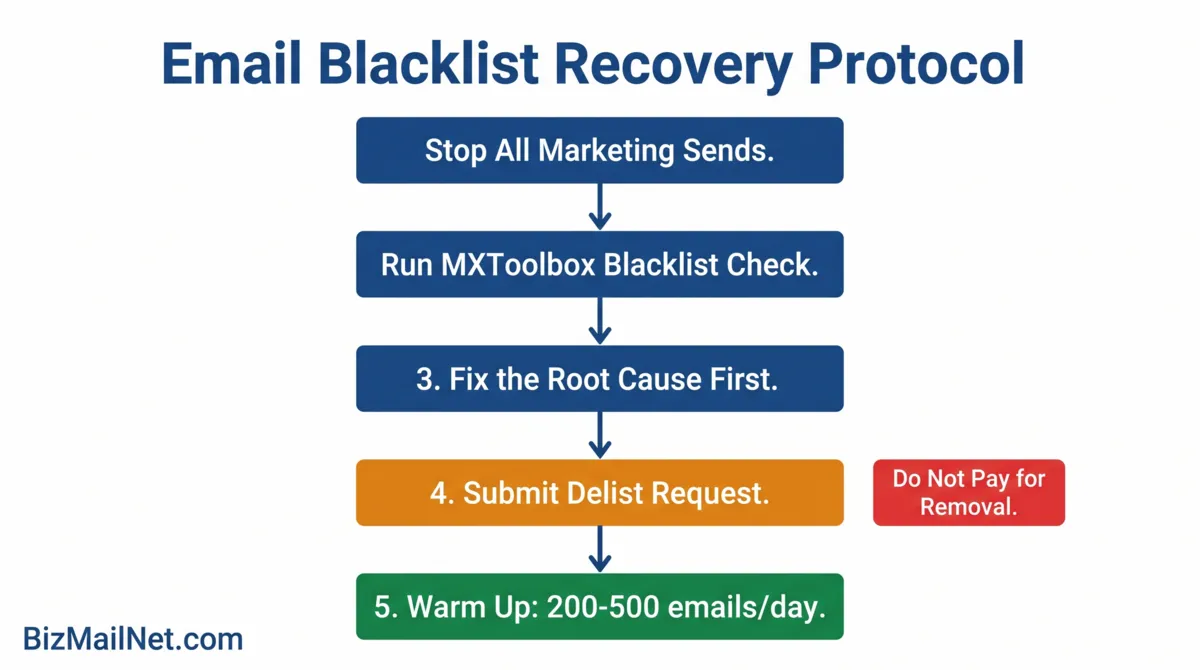
Step 1: Stop All Marketing Sends
Halt all outbound marketing traffic immediately. Do not finish the campaign that is in progress. Do not send a replacement campaign to make up for the one that is failing. Every additional send to a blocked domain deepens the complaint rate and extends the recovery window.
Transactional mail from a separate subdomain and IP can continue if that infrastructure is not affected. Order confirmations, password resets, and account notifications run on a different reputation track if subdomain separation is in place. If transactional and marketing share a domain, pause all sends until the root cause is identified.
Step 2: Identify the Block Source
The MXToolbox blacklist check identifies which lists have flagged the IP or domain. Each listing links to that blocklist's self-service delist portal and explains the criteria for removal. The major blocklists and their removal processes differ enough that treating them identically produces poor results.
Spamhaus: The most authoritative global blocklist. Listings are divided into SBL (Spamhaus Block List for IPs) and DBL (Domain Block List). Spamhaus does not accept payment for removal. Their portal provides a lookup tool that shows the specific reason for listing. Removal requires resolving the listed issue and submitting a request demonstrating that the problem is fixed. Repeat requests without root cause resolution result in longer holds.
Barracuda: The Barracuda Networks Reputation System lists IP addresses based on complaint rates and spam trap hits. Removal is available through Barracuda's self-service portal at barracudacentral.org/rbl/removal. The form asks for the IP address and the reason for the request. Processing typically takes 12 to 24 hours for IPs with no prior listing history.
Microsoft (S3150 / 550 5.7.511): Microsoft's blocks are provider-specific and do not appear on standard public blacklists. The S3150 error and 550 5.7.511 rejection code indicate Microsoft's Sender Policy block. Removal requires the OLC delist portal at microsoft.com/delisting. The submission requires the sending IP, the full NDR with error codes, and a written explanation of remediation steps. Microsoft responds within 48 hours of a complete submission.
URIBL and SURBL: These block domain names found in email body content rather than sending IPs. A listing here means a URL in your email content is flagged. Check the specific URL causing the listing and remove it from future sends.
Step 3: Fix the Root Cause Before Submitting Anything
Blacklist operators check whether the problem causing the listing still exists. Submitting a removal request on a domain that is still generating spam complaints, still sending to spam traps, or still using a compromised account results in an immediate denial. A denial on a first request does not harm the domain's eventual recovery. A pattern of denials can.
Common Root Causes
Spam complaint spike: A single campaign sent to a cold segment generated complaints above the 0.3% threshold. Identify the segment. Remove it from future sends. Run a list verification pass on the full database before reactivating sends.
Spam trap hit: The list contains an address that was converted from a valid contact to a spam trap after the contact abandoned it. Spam trap addresses do not bounce. They accept mail and report it to blocklist operators silently. A list verification tool will flag addresses that have not opened or clicked in extended periods and match patterns associated with trap conversion. Remove them before resubmitting the delist request.
Compromised sending account: An account credential was exposed and used to send phishing mail from the domain. Check the platform's send history for campaigns you did not authorize. Change all passwords and revoke API tokens. Enable two-factor authentication before requesting removal.
Missing or broken authentication: SPF, DKIM, or DMARC failure is contributing to the listing. Verify all three at MXToolbox before submitting. A delist request submitted with a broken authentication stack will not resolve the underlying spam folder routing even after removal from the blocklist.
Step 4: Submit Delist Requests
Once the root cause is resolved and verified, submit removal requests to each blocklist that flagged the IP or domain. Prioritize by impact: Spamhaus and Microsoft blocks affect the widest number of recipients. Barracuda, URIBL, and smaller lists can be addressed in parallel.
Spamhaus removal: Go to spamhaus.org and use the SBL or DBL lookup tool to find the specific listing. The listing page includes a removal request link. Explain the root cause and the steps taken to resolve it. Spamhaus reviews manually for most listings. Response time varies from 24 hours to several days depending on the listing type and the clarity of the remediation explanation.
Barracuda removal: Go to barracudacentral.org/rbl/removal. Enter the sending IP. The form asks for contact information and an explanation of the issue. Barracuda processes most removal requests within 12 to 24 hours for first-time listings.
Microsoft OLC submission: Go to microsoft.com/delisting. The form requires the sending IP address, the specific error code from the NDR (e.g., 550 5.7.511), and a written account of the steps taken. Include the date the block was discovered, the root cause identified, and the specific actions taken to prevent recurrence. Microsoft responds within 48 hours. If the first submission is denied, review the denial reason, address it, and resubmit once. Do not submit repeatedly.
Blacklist Recovery Decision Tree
Select your situation to get the recommended next step.
Post-Recovery Warm-Up Protocol
Delisting removes the block. It does not restore reputation. A delisted domain starts the reputation rebuild from the same low point that triggered the blacklisting. Returning to full send volume without a ramp causes re-listing at the same speed as the original incident.
Weeks 1 and 2: Send only to subscribers who opened or clicked within the last 30 days. Limit volume to 200 to 500 emails per day. Monitor Google Postmaster domain reputation daily. A reputation starting at Low should begin moving toward Medium within two weeks of clean, engaged sends.
Weeks 3 and 4: Expand to subscribers who engaged within the last 90 days. Increase daily volume to 1,000 to 2,000 emails. Continue daily Postmaster monitoring. If reputation is moving toward Medium, the ramp is working. If it stalls or drops, reduce volume and extend week one's segment range for another week.
Weeks 5 through 8: Expand to the full verified list. Suppress all contacts who have not opened in 180 days before this expansion. Continue increasing daily volume by 50% per week until reaching pre-incident volumes. By week eight, domain reputation should be approaching High for senders with a genuinely clean, engaged list.
Run a list verification pass on the entire database before week five. Any spam traps or decayed addresses still in the list will trigger a second incident during the expansion phase.
FAQ: Email Blacklist Removal and Recovery
The first signals are a sudden drop in open rates, a surge in Non-Delivery Reports, and bounce messages containing 550 rejection codes. Verify your status by running your sending IP and domain against MXToolbox's blacklist check, which covers 100+ blocklists simultaneously. Google Postmaster Tools will show a domain reputation drop if Gmail is filtering your mail specifically.
No. Legitimate blocklist operators like Spamhaus and Barracuda do not accept payment for delisting. Third-party services promising fast removal are largely ineffective and some are fraudulent. Removal requires using the blocklist's official self-service portal and demonstrating that the root cause has been resolved. Paying a third party delays the actual fix and can result in re-listing if the underlying problem is not addressed.
A 550 5.7.511 error indicates Microsoft's Sender Policy block. Capture the full NDR including all headers and error codes. Go to the Microsoft OLC delist portal at microsoft.com/delisting. Submit the form with your sending IP, the error code, and a written explanation of the remediation steps taken. Microsoft typically responds within 48 hours. Do not resubmit before the response window has closed.
Switching domains is a short-term workaround that almost always fails. New domains receive an immediate inbox placement penalty from receiving algorithms. If the same dirty list is migrated to the new domain, the new domain will be blacklisted at the same speed as the original. The root cause must be fixed regardless of which domain is used.
Minor blocklists with automated delisting can be cleared in 24 to 72 hours after a properly submitted request. Spamhaus listings require manual review and proof of remediation. Microsoft OLC blocks typically resolve within 48 hours of a complete submission. Full reputation recovery after delisting requires 45 to 60 days of gradual, engaged sending before domain reputation returns to pre-incident levels at Google and other major providers.
Sources
- Martal Group. B2B Cold Email Statistics. 2026. martal.ca (vendor source)
- HackRepair. Fix Email Blacklisting: Complete Guide to Restore Email Deliverability. 2025. hackrepair.com
- Leadfeeder. B2B Email Marketing Guide. 2026. leadfeeder.com
- SQ Magazine. B2B Email Marketing Statistics. 2025. sqmagazine.co.uk
- Warmforge. Ultimate Guide to Removing Yourself from Email Blacklists. 2026. warmforge.ai