Email Deliverability Best Practices B2B 2026: Complete Technical Reference
Your email platform shows 98% delivered. Your sales team is getting zero replies. Those two facts are not contradictory. They describe the same problem: a fourteen-point gap between server delivery and inbox placement that quietly corrupts every downstream channel depending on email engagement data.
Key Findings
- The average B2B email delivery rate is 98.16%. The average B2B inbox placement rate is 84.3%. That fourteen-point gap means one in seven emails never reaches the primary inbox regardless of what the platform dashboard reports.
- 81.6% of B2B senders operate without a published DMARC record. Google and Yahoo enforced strict authentication requirements in 2024. Operating without DMARC in 2026 is not a configuration gap. It is a compliance failure.
- The 0.3% spam complaint threshold is the hard limit enforced by Google Postmaster. Above it, algorithmic throttling begins. Above 0.5%, domain-level filtering applies to all sends regardless of content quality or authentication status.
- Multi-channel workflows that trigger direct mail or paid retargeting based on email delivery receipts fire on false data when emails land in spam. The prospect never saw the message. The workflow treated them as a reached contact.
- Engagement signals now outweigh technical authentication in inbox placement decisions. A perfectly authenticated domain sending to a cold, unengaged list will still land in spam. The algorithm measures whether recipients want the mail, not just whether the sending infrastructure is correct.
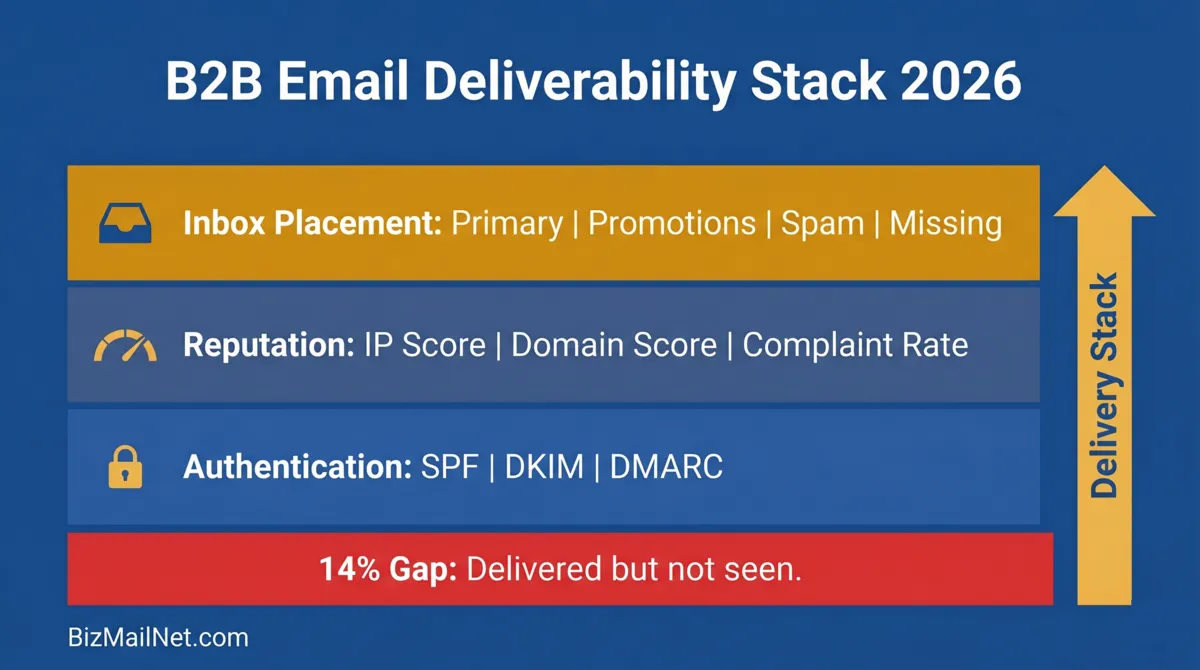
Delivery Rate vs Inbox Placement Rate: Why the Gap Matters
Most B2B marketing teams watch one metric: the delivery rate. The platform confirms 98% delivered, the campaign is marked successful, and the pipeline team waits for replies that do not come. What the delivery rate does not show is where those delivered emails landed.
The gap exists because mail server acceptance and inbox placement are separate decisions made by separate systems. The receiving server accepts the message and confirms delivery. The spam filter then evaluates the message independently and decides where to route it. A message can pass both checks and still land in the promotions tab. It can pass server acceptance and fail the spam filter entirely, landing in the junk folder with zero notification to the sender.
Outlook sits at 75.6% inbox placement for B2B senders, the lowest of any major provider. Gmail reaches 83%. Yahoo approaches 88%. If your primary B2B audience uses Microsoft 365, one in four emails is not reaching the primary inbox regardless of what your platform dashboard shows.
The downstream consequences go beyond open rates. Multi-channel workflows that trigger direct mail pieces, SMS messages, or paid retargeting sequences based on email delivery confirmations are operating on false engagement data. A prospect whose email landed in spam never interacted with it. Treating them as a reached contact and firing an expensive offline follow-up wastes budget and produces attribution data that cannot be trusted.
"Spam filters no longer just look at technical setups. They rely heavily on engagement signals. If a list yields no opens, clicks, or replies, the algorithm rapidly learns that the emails are unwanted and routes them to spam regardless of perfect authentication." r/emaildeliverability, 2026 (anecdotal)
The only way to measure inbox placement accurately is through third-party seed list testing, covered in detail in the seed list testing guide. Platform-reported delivery rates are a starting point, not a measure of campaign reach.
Authentication Requirements: Gmail, Outlook, and Yahoo in 2026
Authentication is no longer a recommended practice. Google and Yahoo enforced strict requirements for bulk senders in 2024 and tightened compliance checks through 2025 and into 2026. Operating without a full authentication stack in 2026 is a compliance failure, not a configuration gap.
SPF: Authorizing Your Sending Servers
SPF is a DNS TXT record listing every mail server authorized to send email on behalf of your domain. When a receiving server gets a message claiming to be from your domain, it checks the SPF record and either passes or fails the sending server. A fail does not guarantee rejection but does increase the probability of spam folder routing.
The 10-lookup limit is the most common SPF failure for B2B senders. Adding a CRM, a support desk, a marketing platform, and a transactional email tool to one SPF record frequently exceeds the protocol's limit of ten DNS lookups per evaluation. When the limit is exceeded, the entire SPF check fails. Audit your SPF record against MXToolbox's lookup counter every time a new sending service is added, and flatten nested includes where possible.
DKIM: Signing Every Outgoing Message
DKIM adds a cryptographic signature to every outgoing email using a private key held by the sending server. The receiving server verifies the signature against a public key stored in your DNS. A valid signature confirms the message originated from your domain and was not altered in transit.
Most email platforms generate a DKIM key and provide a DNS record for you to add. Use a 2048-bit key minimum. 1024-bit keys are considered weak by 2026 standards and will be rejected by some enterprise receiving servers. After adding the DNS record, allow 24 to 48 hours for propagation before verifying with MXToolbox using the selector string provided by your platform.
DMARC: Enforcement and Reporting
DMARC builds on SPF and DKIM by adding a policy layer. It tells receiving servers what to do when a message fails authentication: do nothing (p=none), send to spam (p=quarantine), or reject entirely (p=reject). It also routes aggregate failure reports to an address you specify.
The progression matters. Start at p=none for several weeks to collect reports and confirm legitimate sends are passing cleanly. Move to p=quarantine once reports show no false failures. Advance to p=reject after 30 days of clean quarantine data. Operating at p=none indefinitely satisfies neither Google's bulk sender requirements nor any meaningful domain protection standard.
Subdomain Separation
Marketing and transactional emails must never share a sending domain. A complaint spike from a promotional campaign can contaminate the domain reputation used for order confirmations and password resets. Use separate subdomains with independent SPF, DKIM, and DMARC records: mail.yourdomain.com for marketing, tx.yourdomain.com for transactional. This isolates reputation damage to the channel that caused it.
The full step-by-step DNS configuration walkthrough per platform (Gmail Workspace, Microsoft 365, Mailchimp) is in the DMARC, DKIM, and SPF setup guide for small business.
DMARC/DKIM/SPF Configuration Builder
Select your domain host and email platforms to generate exact DNS TXT record strings and a health score for your current setup.
Reputation Monitoring and IP Warming for B2B Senders
Technical authentication gets mail to the door. Reputation determines whether the door opens. In 2026, engagement signals carry more weight than authentication records in inbox placement decisions at Gmail and Microsoft. A domain with perfect SPF, DKIM, and DMARC sending to a cold list of non-openers will still land in spam.
Google Postmaster Tools
Postmaster Tools is the only source of ground truth for Gmail inbox placement. After verifying your sending domain, the dashboard provides daily domain reputation scores (High, Medium, Low, Bad), spam rate data, and IP reputation tracking. Check domain reputation weekly at minimum. High-volume B2B senders need daily checks. A drop from High to Medium does not require panic, but it requires investigation of the most recent sends to find the segment responsible.
Third-Party Reputation Dashboards
Validity Everest provides full sender certification and reputation tracking across multiple inbox providers. The entry cost is enterprise-level (estimated $35,000 to $65,000 annually), which puts it outside the range for most SMBs. Validity's Sender Certification program, however, has a documented track record: Network Digital Marketing achieved 99% inbox placement sending weekly to three million professionals by combining strict list hygiene with Sender Certification. For SMBs, GlockApps and Mail-Tester provide comparable placement testing at a fraction of the cost.
IP Warming
New dedicated IPs carry no sending history. Receiving servers treat unknown IPs with suspicion regardless of domain reputation. The warm-up process ramps volume gradually over four to six weeks, starting with a few hundred emails per day to your highest-engagement segment, increasing daily volume as positive signals accumulate.
Al Iverson, editor of Spam Resource, puts the principle plainly: lots of perfectly technically compliant mail lands in the spam folder because it is measured as having low value to recipients. Engaging mail delivers. Unwanted mail does not. The warm-up works only when the content going out is genuinely relevant to the recipients receiving it.
The full comparison of reputation monitoring tools (250ok, Validity, SenderScore, Google Postmaster) with 2026 pricing is in the email reputation monitoring guide.
Seed List Testing Methodology
A seed list is a controlled set of test addresses spread across Gmail, Outlook, Yahoo, Apple Mail, and other providers. Send your campaign to the seed list before it goes to your live audience and check where each address received the message. The result tells you where you actually land, not where the platform estimates you land.
Manual Seed Lists
A manual seed list of 15 to 25 personal accounts across major providers works for basic tab and spam placement checks. Create accounts across Gmail, Outlook.com, Yahoo, and Apple iCloud. Send a test campaign before every major send and check each inbox. This costs nothing and catches obvious failures. It does not provide provider-level filtering telemetry or volume-weighted placement data.
Automated Seed Testing Tools
GlockApps runs seed tests across 80+ inbox providers and returns placement breakdowns by provider. A single test covers Gmail, Outlook, Yahoo, Apple Mail, and dozens of others simultaneously. Run a test before every high-volume campaign and after any DNS or content change. Inbox Monster and MailMonitor offer comparable services at similar price points.
A "Missing" result in a seed test means the receiving server accepted the message but it never arrived at the test address. This outcome indicates the IP or domain is on an aggressive blocklist. It is not the same as a spam folder result. Missing emails need a blacklist check, not a content review.
The full framework for interpreting seed list results by provider, including tab placement patterns and filtering logic, is in the seed list testing guide.
Reverse DNS Configuration and Domain Monitoring
Reverse DNS (rDNS) maps an IP address back to a hostname. When a receiving server checks whether an incoming connection is legitimate, it often performs an rDNS lookup. If the IP address resolves to a generic hostname or nothing at all, some receiving servers treat the connection as suspicious before the message content is ever evaluated.
Setting Up rDNS
rDNS configuration is controlled by whoever owns the IP address, typically your email service provider or hosting company, not your domain registrar. For dedicated IPs, contact your ESP and request a PTR record pointing the IP to a hostname matching your sending domain. For shared IP pools, the ESP manages rDNS on your behalf. Confirm your dedicated IP has a valid PTR record using the MXToolbox reverse lookup tool.
Domain Monitoring and Alert Setup
Set up automated weekly blacklist checks for all sending domains and IPs. MXToolbox monitors against 100+ lists and sends alerts when a listing is detected. Google Postmaster Tools alerts are available through the dashboard and should be enabled for any domain reputation drop. The goal is to find a reputation problem before it has been running for two weeks. At that point, complaint rates have already accumulated and the recovery window is narrower.
Recovery Strategies for Email Reputation Damage
A sudden drop to zero open rates is almost always a blacklisting event. The instinct is to submit a removal request immediately. That is the wrong move. Submitting a delist request before fixing the underlying problem results in a denial, and repeat denials extend the time to recovery at some blocklists.
Step 1: Stop All Marketing Sends
Halt all outbound marketing traffic immediately. Continuing to send while blacklisted deepens the reputation damage and increases the complaint rate that triggered the block in the first place. Transactional mail from a separate subdomain can continue if that domain is not affected.
Step 2: Identify the Block Source
Run your sending IP and domain against MXToolbox's blacklist check. The result identifies which blocklists have listed you and gives you the lookup link to each one's self-service delist portal. Common blocklists include Spamhaus, Barracuda, Sorbs, and URIBL. Microsoft's S3150 error and 550 5.7.511 blocks are provider-specific and require Microsoft's OLC delist portal rather than a standard blocklist removal process.
Step 3: Fix the Root Cause
Blocklist operators verify that the problem causing the listing has been resolved before approving removal. Common root causes include exceeding the spam complaint threshold, hitting spam traps in an unclean list, a compromised sending account, missing or broken authentication records, or sudden volume spikes from a new IP. Identify the cause from server logs and bounce data, fix it completely, and document the steps taken before submitting any removal request.
Step 4: Submit Removal Requests
Each blocklist has its own portal and criteria. Spamhaus does not accept payment for removal and will deny requests that do not demonstrate the root cause has been resolved. Barracuda's removal form asks for IP addresses and an explanation of remediation. Microsoft's OLC portal requires the full NDR including error codes (550 5.7.511 for sender policy blocks) and a written account of the steps taken to prevent recurrence.
Step 5: Warm Up Before Full Volume Returns
After delisting, treat the sending infrastructure as a new IP. Ramp volume gradually over two to four weeks, starting with the highest-engagement segment only. Monitor Postmaster Tools daily during the recovery period. A single complaint spike above 0.3% during recovery can trigger a second listing on some blocklists before the first has fully cleared.
The full triage guide, including ISP escalation paths and the Microsoft S3150 recovery protocol, is in the email blacklist removal and recovery guide.
Email Deliverability and Multi-Channel Attribution
The deliverability problem is not just an email problem. It corrupts every channel that uses email engagement as a trigger or a signal. When a marketing automation workflow fires a direct mail piece three days after an email "delivery," it assumes the prospect received and processed the message. If the email landed in spam, the direct mail arrives without context, the follow-up call references a message no one read, and the attribution model credits the email channel for an assist it never made.
Shared attribution models that account for email's indirect influence on downstream conversions are more accurate than last-click models, but they require the engagement data feeding them to be real. Open rates, click rates, and reply signals from emails that landed in spam are either absent or artificially suppressed. Any attribution model built on that data undervalues email's contribution when it works and overstates it when it fails.
The practical fix is to connect offline and retargeting triggers to verified inbox placement data rather than server delivery receipts. Platforms with open API access can receive placement confirmation from a seed testing tool before a campaign goes live. Direct mail triggers should follow confirmed opens or clicks rather than delivery events. A prospect who opened the email is a reached contact. A prospect whose email was delivered but not seen is not.
FAQ: Email Deliverability Best Practices B2B 2026
Delivery rate measures whether an email reached the receiving mail server without bouncing. Inbox placement rate measures where the email landed after arriving: primary inbox, spam folder, or promotions tab. A 98% delivery rate can coexist with a 60% inbox placement rate if the receiving server accepts the mail but routes it to spam. Most marketing platforms report delivery rate only. Third-party seed list testing is the only way to measure inbox placement across multiple providers accurately.
Start at p=none to monitor authentication failures without blocking mail. After reviewing DMARC aggregate reports for several weeks and confirming legitimate sends are passing SPF and DKIM, move to p=quarantine, which routes failing mail to spam rather than rejecting it. Once quarantine is stable for 30 days, advance to p=reject. Google and Yahoo require at minimum a published DMARC record for bulk senders. Operating at p=none indefinitely provides no domain protection and does not satisfy 2026 enforcement requirements.
Multi-channel workflows that trigger direct mail or paid retargeting based on email delivery receipts will fire on false data if emails are landing in spam. A prospect whose email went to the spam folder never saw the message, yet the workflow treats them as a reached contact and triggers an expensive offline follow-up. Connecting email triggers to verified inbox placement data rather than server delivery receipts prevents wasted spend on outreach that follows a message no one saw.
SPF validation allows a maximum of 10 DNS lookups per record evaluation. Businesses that add multiple third-party senders to their SPF record can exceed this limit, causing the entire SPF check to fail even for legitimate mail. Use the include: mechanism sparingly, flatten nested includes where possible, and audit your SPF record against a lookup counter tool like MXToolbox whenever a new sending service is added.
Recovery time depends on which blacklist the domain or IP is listed on and whether the root cause has been fully resolved. Minor blocklists with automated delisting processes can be cleared in 24 to 72 hours after a removal request is submitted. Spamhaus listings require manual review and resolution of the underlying issue. Microsoft blocks require submission through the OLC delist portal with documentation of remediation steps. None of these processes should be attempted before the root cause has been fixed completely.
Warm-up tools that simulate engagement between seed inboxes can establish initial sending volume on a new domain or IP, but Google and Microsoft have improved detection of artificial engagement patterns. Tools using real inbox networks rather than synthetic signals produce more defensible results. The most reliable warm-up approach combines a gradual volume ramp with real campaign content sent to the highest-engagement segment first. No warm-up tool substitutes for clean authentication records and a verified list.
Sources
- Forrester. B2B Email Deliverability Benchmarks. Via The Digital Bloom. 2025. thedigitalbloom.com
- Litmus. Email Marketing ROI. Via SQ Magazine. 2025. sqmagazine.co.uk
- Martal Group. B2B Cold Email Statistics. 2026. martal.ca (vendor source)
- Netcore Cloud. Mastering Email Deliverability 2025. 2025. netcorecloud.com (vendor source)
- Al Iverson. Email Deliverability in 2026: What's Next. Spam Resource. 2026. spamresource.com
- Validity. Network Digital Marketing Case Study. 2025. validity.com (vendor source)
- HackRepair. Fix Email Blacklisting: Complete Guide. 2025. hackrepair.com
- Data Axle. Shared Attribution in Email Marketing. 2025. data-axle.com
- Reddit. r/emaildeliverability. We scored 10/10 on email deliverability for a client who was getting zero replies. 2026. reddit.com (anecdotal)
- MarketBetter. B2B Email Deliverability Guide 2026. 2026. marketbetter.ai
Also on BizMailNet