Seed List Testing: Verify Email Deliverability Before Campaign Launch
A 99% delivery rate means your email reached the server. It tells you nothing about whether it reached the inbox. Campaign managers spend hours optimizing subject lines while their emails land in spam, a problem a ten-minute seed list test would have caught before launch.
Key Findings
- The global average inbox placement rate is 83.1%. Gmail primary inbox placement in Q4 2025 averaged 56.97%. Outlook averaged 45.06%. Platform delivery rates hide both numbers.
- Only 23.6% of B2B senders verify their lists before launching a campaign. The other 76.4% are operating with no pre-flight placement check.
- A "Missing" seed result indicates a blocklist interception, not a spam folder placement. It requires a blacklist diagnostic, not a content revision.
- Seed tests must run from the exact same IP and domain used for the live campaign. Testing from a staging environment produces results that do not transfer to production.
- List decay averages 22.5% annually for B2B databases. A list that was clean six months ago likely contains addresses that will trigger spam traps on the next send.
The Inbox Placement Blind Spot
Marketing platforms report two states: delivered and bounced. There is no native reporting for spam folder, promotions tab, or missing. A campaign with a 98% delivery rate and a 40% primary inbox placement rate looks identical to a campaign with 98% delivery and 95% primary placement in your platform dashboard.
The blind spot compounds in multi-channel workflows. A direct mail trigger or a paid retargeting sequence fires based on delivery confirmation. The prospect whose email landed in spam never saw the message. The automation treats them as a reached contact. The attribution data reflects an email impression that never happened.
Seed list testing closes the blind spot by measuring placement before the live send, not after. A ten-minute test before a 50,000-email campaign is not a nice-to-have for high-volume senders. It is the difference between sending confidently and discovering a spam folder problem two days after launch when open rates collapse.
Building a Manual Seed List
A manual seed list covers the basics at zero cost. Create 15 to 25 personal email accounts spread across major providers. A practical distribution for B2B testing:
| Provider | Accounts | Why Include It |
|---|---|---|
| Gmail (personal) | 4–5 | Largest consumer provider; Promotions tab filtering is the most common placement issue |
| Outlook.com | 3–4 | Microsoft consumer inbox; 45% primary placement average makes it the highest-risk provider |
| Microsoft 365 (business) | 2–3 | The actual environment most B2B prospects use; separate from Outlook.com filtering |
| Yahoo Mail | 2–3 | Different spam filters from Google and Microsoft; catches issues that pass the others |
| Apple iCloud | 2 | Apple's Mail Privacy Protection affects open rate data; placement check is still meaningful |
| Other (Proton, Zoho) | 1–2 | Niche providers your audience may use; optional based on your contact list demographics |
Send your campaign to the seed list first, using the exact same sending infrastructure as the live campaign. The same domain, the same IP, the same platform account. Check each inbox within 15 minutes of sending. Note whether each address received the email in primary inbox, spam, promotions, or not at all.
Manual seed lists have two limits. They cannot check placement at providers you do not have accounts with. And they cannot tell you the reason for a spam placement: whether it is content, reputation, or a specific filter that triggered. Paid tools answer both questions.
Automated Seed Testing Tools
Automated tools send your campaign to a pre-built network of seed addresses and return provider-level placement data within minutes. The results include inbox, spam, promotions, and missing rates per provider, plus HTML rendering previews and content flag analysis.
GlockApps
GlockApps tests across 80+ inbox providers and returns placement breakdowns by provider. A single test covers Gmail, Outlook, Yahoo, Apple Mail, and dozens of corporate and regional providers simultaneously. Run a test before every high-volume campaign and after any DNS or content change. Credit-based pricing means you pay per test rather than per month, which works well for teams that do not test daily.
Inbox Monster
Inbox Monster focuses on deliverability analytics at enterprise volume. The platform provides placement testing alongside engagement prediction and content scoring. Better suited to high-volume senders running multiple campaigns per week where the per-test cost of credit-based tools adds up.
Mail-Tester
Mail-Tester generates a single test address, evaluates the email you send to it, and returns a score out of 10 with a breakdown of authentication failures, content flags, and blacklist status. It does not test across multiple providers. Use it for a fast authentication and content check rather than a full placement test.
"Content repetition is severely penalized. Sending identical emails to multiple recipients rapidly triggers pattern detection filters. Plain text configurations are outperforming heavy HTML designs by a wide margin in 2025 and 2026." r/coldemail, 2026 (anecdotal)
Interpreting Your Seed Test Results
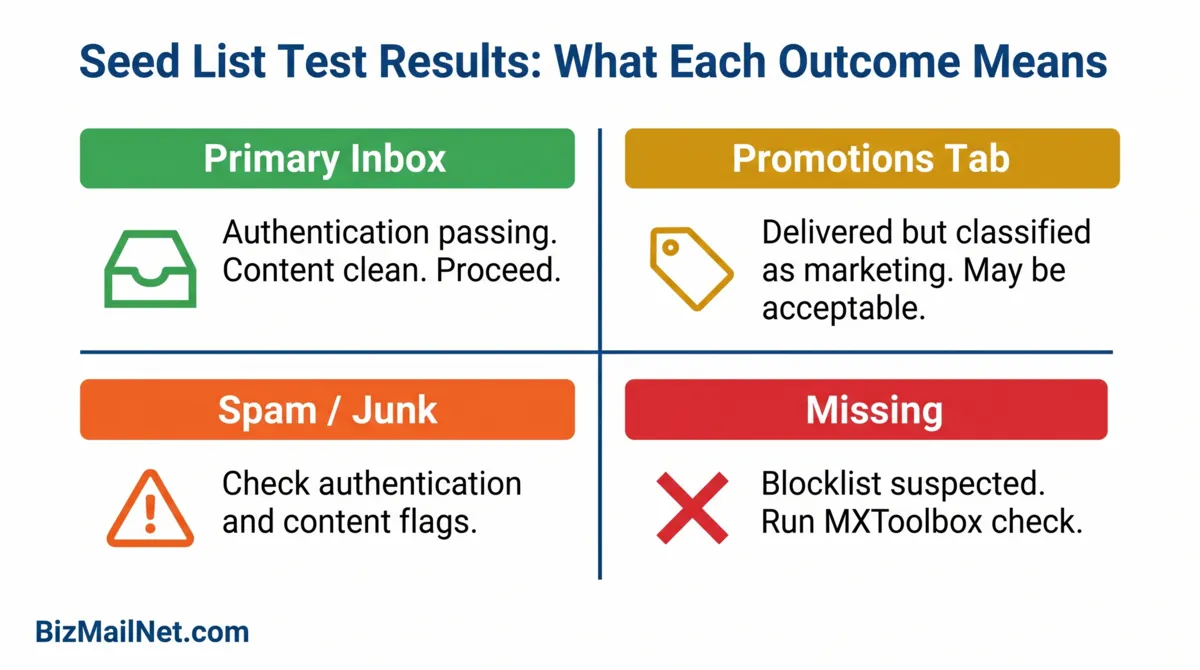
Four placement outcomes are possible. Each points to a different root cause and requires a different fix.
Primary inbox (target): The message reached the main tab at the provider. Authentication is passing, content is not triggering filters, and reputation is clean for this provider. No action needed.
Promotions or Other tab: Most common at Gmail. The message was authenticated and delivered but classified as marketing content. This is not a spam folder result. Many B2B newsletters land in Promotions and still perform well. If your audience expects the email and searches for it, Promotions placement may not be a problem. If open rates are weak, it may be worth testing a simpler HTML structure.
Spam or Junk folder: Authentication may be failing, content may be triggering filters, or reputation with this provider is degraded. Check the authentication stack first: verify SPF, DKIM, and DMARC are passing at MXToolbox. If authentication is clean, run the email through Mail-Tester for content flag analysis. A spam result at one provider but inbox at others usually indicates a provider-specific reputation issue rather than a content problem.
Missing (no delivery): The receiving server accepted the email at the SMTP level but it never arrived. This is not a spam folder result. Missing emails indicate a blocklist interception or a severe reputation failure at that provider. Run a blacklist check at MXToolbox immediately. Do not revise content until the blocklist situation is diagnosed. The full recovery protocol is in the blacklist recovery guide.
Seed List Result Interpretation Guide
Enter your seed test results to identify the most likely root cause and the recommended next step.
Pre-Launch Protocol: When to Send and When to Hold
The seed test result determines whether the campaign goes out as planned, goes out with modifications, or holds entirely.
Send as planned: Inbox 85% or above, spam below 5%, missing below 2%. These benchmarks indicate clean authentication, no notable content flags, and acceptable reputation at tested providers.
Send with modifications: Inbox 70 to 84%, spam 5 to 15%, missing below 5%. Review content for image-heavy layouts, URL shorteners, and link count. Strip tracking pixels if testing a cold outreach campaign. Simplify HTML structure. Re-test before sending.
Hold and diagnose: Spam above 15% or missing above 5%. Do not send the live campaign. Run authentication checks first (MXToolbox for SPF, DKIM, DMARC). If authentication is clean, run content through Mail-Tester for filter analysis. If missing rate is high, run a blacklist check. Resolve the root cause and re-run the seed test before proceeding.
FAQ: Seed List Testing for Email Deliverability
A seed list is a controlled set of test email addresses spread across major inbox providers. Before sending a campaign to a live audience, you send it to the seed list and check where each address received the message. The results show primary inbox, spam, promotions tab, and missing placement across providers before any live recipients are affected.
A high missing rate means the receiving server accepted the email at the SMTP level but it never arrived at the test address. This typically indicates the sending IP or domain is on an aggressive blocklist that intercepts and silently drops mail after acceptance. A missing result is more serious than a spam result. Run a blacklist check at MXToolbox before making any content or authentication changes.
A manual seed list of 15 to 25 personal accounts works for basic placement checks at low cost. Paid tools like GlockApps test across 80+ providers simultaneously and return provider-level filtering data that manual tests cannot measure. High-volume senders need paid tools. SMBs sending monthly newsletters can start with a manual list and upgrade when volume justifies it.
No. Seed lists measure current inbox placement based on existing reputation and content. They do not scan your subscriber list for hidden spam traps. A seed test can show clean results while spam traps remain in your database ready to trigger a reputation drop on the next live send. List verification tools identify potentially dangerous addresses before they are mailed.
Yes, always. Running a seed test from a staging server or test account produces results tied to that infrastructure's reputation, not the production sending IP. Inbox placement algorithms evaluate the specific IP and domain combination being used. Testing from a different IP and concluding the live campaign will perform similarly is a false signal. Send the seed test from the exact same platform, domain, and IP that will send the live campaign.
Sources
- Prospeo. What Is a Seed List? 2025. prospeo.io (vendor source)
- Forrester. B2B Email Deliverability Benchmarks. Via The Digital Bloom. 2025. thedigitalbloom.com
- Allegrow. The Complete Guide to Improving Email Deliverability for B2B. 2025. allegrow.co
- Reddit. r/coldemail. Deliverability tanked after Google/Yahoo changes. 2026. reddit.com (anecdotal)