Email Deliverability Audit Guide: Stop Emails Going to Spam (2026)
Open rate drops from 35% to 8% in a single week. The subject line is not the problem. The domain is. Before rewriting copy or rebuilding templates, run through this audit. Most deliverability failures trace back to three DNS records and a list that has never been cleaned.
Key Findings
- 17% of B2B cold emails never reach the primary inbox. Outlook inbox placement sits at 75.6%, the lowest of any major provider. Most senders attribute the problem to content when infrastructure is the cause.
- Domains with SPF, DKIM, and DMARC all correctly configured are 2.7 times more likely to reach the primary inbox than domains missing any one of the three.
- A 90-day list cleaning routine reduces bounce rates by 37% on average. For B2B databases with 23% annual decay, cleaning is a prerequisite for deliverability.
- DMARC set to policy "none" is the most common configuration failure. It reports authentication failures without blocking or redirecting them. Google and Yahoo require enforcement-level DMARC for bulk senders in 2026.
- Inbox placement rate and deliverability rate measure different things. A 99% deliverability rate can coexist with a 40% inbox placement rate. Only seed list testing reveals where mail actually lands.
What Email Deliverability Actually Measures
Most email platforms report a deliverability rate: the percentage of emails that reached a mail server without a hard bounce. That number tells you almost nothing about whether recipients are reading the message. An email that lands in the spam folder counts as delivered.
The metric that matters is inbox placement rate: the percentage of delivered emails that land in the primary inbox rather than spam or promotions. Most platforms do not report this by default. You need a third-party seed list test to measure it accurately.
Google Postmaster Tools gives a domain reputation score that correlates with inbox placement. A domain rated "High" places reliably. A domain rated "Low" or "Bad" is being filtered before content is ever evaluated. Check Postmaster Tools before assuming a content or subject line problem exists.
The audit in this guide works through the technical layers in order: DNS authentication first, then list hygiene, then sending behavior, then content signals. Each layer depends on the one below it. Fixing subject lines on a domain with no DMARC record will not move the needle.
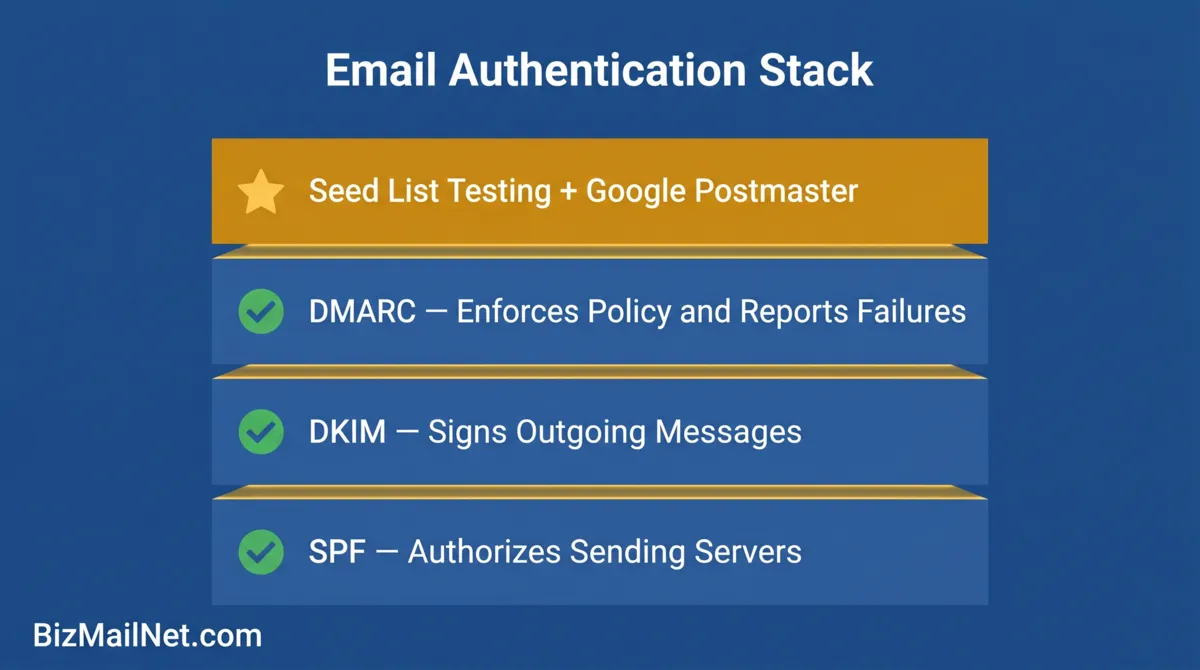
The Technical Foundation: SPF, DKIM, and DMARC
Three DNS records now function as hard gates for inbox placement. Google and Yahoo enforced them for bulk senders in 2024 and have tightened compliance checks through 2026. Missing any one of the three increases the probability of spam folder placement regardless of content quality or sender reputation history.
SPF (Sender Policy Framework)
SPF is a DNS TXT record that lists the mail servers authorized to send email on behalf of your domain. When a receiving server gets a message claiming to be from your domain, it checks the SPF record to verify the sending server is on the approved list. If it is not, the message fails SPF and is more likely to be filtered.
Check your SPF record at MXToolbox. A passing result shows "SPF Record Found." A failing result means no record exists or the sending platform's servers are not included. Each email marketing platform publishes its SPF include string; add it to your DNS record and verify the lookup limit (maximum 10 DNS lookups per SPF evaluation).
DKIM (DomainKeys Identified Mail)
DKIM adds a cryptographic signature to every outgoing email. The receiving server checks the signature against a public key stored in your DNS. A valid signature confirms the message came from your domain and was not altered in transit. Most email platforms generate a DKIM key and provide the DNS record you need to add. Verification takes 24 to 48 hours to propagate.
Run a DKIM check at MXToolbox using the selector your platform provides. "DKIM Valid" is the passing state. If your platform shows DKIM enabled but MXToolbox shows no record, the DNS entry may not have propagated or was entered incorrectly.
DMARC (Domain-based Message Authentication, Reporting, and Conformance)
DMARC is the enforcement layer. It tells receiving servers what to do when a message fails SPF or DKIM: do nothing (none), send to spam (quarantine), or reject outright (reject). It also generates aggregate reports of authentication failures, which are sent to an email address you specify.
Policy "none" is the most common failure mode. It generates reports but takes no action on failing messages, offering no real protection and not satisfying Google's bulk sender requirements. Move to "quarantine" once authentication is confirmed clean, then to "reject" after a month of clean reporting data.
Subdomain Separation
Marketing and transactional emails should never share a sending domain. A complaint spike from a promotional campaign can contaminate the domain reputation used for order confirmations and password resets. Separate subdomains isolate the risk: mail.yourdomain.com for marketing sends, tx.yourdomain.com for transactional. Configure separate SPF, DKIM, and DMARC records for each subdomain.
Third-Party Audit Tools for B2B Email Deliverability
Platform-reported open rates and bounce rates are not sufficient for a deliverability audit. You need external tools that test from the receiving side, not the sending side.
Mail-Tester
Mail-Tester generates a unique test address. Send a campaign email to that address and receive a score out of 10 with a breakdown of authentication failures, content flags, blacklist checks, and formatting issues. It is the fastest free starting point for diagnosing obvious problems. Scores below 8 typically indicate one or more authentication failures or a content signal triggering spam filters.
MXToolbox
MXToolbox provides individual record lookups for SPF, DKIM, DMARC, and MX records. Run each check separately and save the results before making any DNS changes. The blacklist check covers 100+ IP and domain reputation lists. A listing on even a minor blacklist can suppress inbox placement with certain receiving servers.
Google Postmaster Tools
Postmaster Tools requires verification of your sending domain with Google. Once verified, it provides daily domain reputation scores, spam rate data, and IP reputation tracking. The spam rate dashboard is especially useful: Google requires bulk senders to maintain spam rates below 0.1%. Above 0.3%, Gmail inbox placement falls sharply. This is the only tool that shows what Google specifically sees from your domain.
GlockApps
GlockApps runs seed list tests across 80+ inbox providers and returns inbox placement, spam folder, and promotions tab rates for each provider separately. A single test costs a few credits and reveals where your mail actually lands across Outlook, Gmail, Yahoo, Apple Mail, and others simultaneously. Run a GlockApps test before any high-volume campaign and after any major DNS or content change.
"The technical stuff matters less than people think once your basics are in order. The real problem we see at scale is engagement signals. Gmail especially looks at whether your list is actually opening and clicking. A technically clean domain sending to a cold, unengaged list will still go to spam." r/SaaS, April 2026 (anecdotal)
IP Warming vs Seed List Testing: What Each One Does
These are two different tools for two different problems. IP warming builds sending reputation on a new IP address. Seed list testing measures where current sends are actually landing. Confusing the two leads to the wrong fix being applied.
IP Warming
A new dedicated IP has no sending history. Receiving servers treat it with suspicion. IP warming ramps up send volume gradually over four to six weeks, starting with a few hundred emails per day to your most engaged subscribers, then increasing daily volume as positive engagement signals accumulate.
Warm-up tools that simulate engagement between seed inboxes can supplement this process but carry risk in 2026: Google has improved detection of artificial engagement patterns. The most defensible warm-up approach uses real campaign content sent to your highest-engagement segment first. Positive replies, opens, and clicks from real recipients build more durable reputation than synthetic signals.
Seed List Testing
A seed list is a set of test email addresses spread across major inbox providers. Send your campaign to the seed list and check where each address received the message. GlockApps automates this process and returns a placement breakdown by provider.
Run a seed test before every major campaign, not after. A placement failure found before send can be corrected. A placement failure found after the campaign has already gone to 50,000 contacts cannot be reversed.
For seasonal businesses returning from a multi-month hibernation, seed list testing is mandatory before the first send of the active season. The reactivation sequence and full warm-up protocol for seasonal senders is covered in the seasonal email marketing guide.
List Hygiene Protocol for B2B Email Lists
A technically clean domain sending to a degraded list will still land in spam. That sequence is worth repeating. List hygiene is not a one-time task at list import. It is an ongoing process that runs on a fixed schedule regardless of campaign activity.
Hard Bounce Threshold
Keep hard bounces below 0.5% of any send. Most inbox providers begin flagging domains when hard bounce rates exceed 2%. Suppress hard bounces immediately after every campaign. Do not wait for the next cleaning cycle. Any address that hard bounces should never be mailed again.
Role-Based Address Removal
Role-based addresses such as info@, sales@, admin@, support@, contact@. These are monitored by multiple people or routed to shared inboxes. They generate disproportionate spam complaints and cannot be attributed to a single decision-maker. Remove them before loading any list into the platform, not after a complaint spike occurs.
Verification Tools
Hunter.io and EmailVerifier both offer bulk list verification that checks deliverability without sending a real email. Each tool checks the mail server record, tests the address format, and classifies addresses as valid, risky, or invalid. Run verification before any cold outreach campaign and before any major reactivation send.
Re-Engagement Before Culling
Before suppressing cold subscribers, run a three-email re-engagement sequence. Email one asks if they want to stay subscribed. Email two offers an incentive to re-engage. Email three is a final notice. Contacts who do not open or click any of the three are suppressed. This preserves any remaining deliverable addresses while removing unresponsive contacts that would otherwise drag down engagement rates.
Contacts who have not opened in 180 days should be placed in a suppression review. In a B2B context with long sales cycles, some of those contacts may still be valid buyers who simply have not triggered a send recently. Segment them into a low-frequency track before full suppression rather than culling all at once.
Email Deliverability Checklist: 18-Point Pre-Campaign Audit
Section 1: DNS Records
Section 2: List Health
Section 3: Sending Behavior
Section 4: Content Signals
Section 5: Monitoring Tools
FAQ: Email Deliverability Audit for B2B Senders
Go to MXToolbox.com and run a DMARC lookup for your sending domain. A passing result shows your current policy level: none, quarantine, or reject. A policy of "none" means failures are reported but not blocked. This does not meet Google and Yahoo bulk sender requirements for 2026. Move to "quarantine" after confirming SPF and DKIM are passing cleanly, then advance to "reject" after reviewing 30 days of DMARC aggregate reports.
Keep hard bounces below 0.5% of any send. Most inbox providers begin flagging domains when hard bounce rates exceed 2%. For B2B lists with natural decay of 23% per year, running a verification pass before any major campaign keeps bounce rates in the acceptable range without waiting for a deliverability failure to force action. Suppress hard bounces immediately after every campaign. Do not batch them for the next cleaning cycle.
Deliverability rate measures whether the email reached the mail server without bouncing. Inbox placement rate measures where it landed: primary inbox, spam folder, or promotions tab. A 99% deliverability rate with a 40% inbox placement rate means most mail is reaching the spam folder undetected by standard platform metrics. Third-party seed list testing via GlockApps is the only way to measure true inbox placement across multiple providers simultaneously.
Warm-up tools that simulate engagement between known seed inboxes help establish sending reputation on a new domain or IP, but inbox providers have improved detection of artificial engagement patterns. The most reliable warm-up approach combines a legitimate gradual send ramp with real campaign content sent to your most engaged subscribers first. Tools like MailReach use networks of real inboxes rather than synthetic signals, which produces more defensible results. No warm-up tool replaces the underlying requirement for clean authentication and a healthy list.
Run a full verification pass at least every 90 days for active B2B lists. With 23% average annual list decay, a list that was clean six months ago will have meaningful degradation. Before any high-volume send or seasonal reactivation, run a verification pass first regardless of when the last cleaning occurred. Hard bounces should be suppressed immediately after any campaign. Role-based addresses should be removed before the list is loaded into the platform at all.
Sources
- MarketBetter. B2B Email Deliverability Guide: Stop Landing in Spam 2026. 2026. marketbetter.ai
- SQ Magazine. Email Deliverability B2B Guide. 2025. sqmagazine.co.uk
- MailReach. Email Warm-Up and Seed Testing. 2026. mailreach.co (vendor source)
- Reddit. r/SaaS. Engagement signals and inbox placement. 2026. reddit.com (anecdotal)