Email Reputation Monitoring: Watch for Spam Folder Signals
In February 2026, Microsoft deployed undocumented rate limiting that caused 550 permanent rejections across the B2B sector. Teams using standard platform dashboards saw nothing wrong. Their aggregate delivery metrics looked fine. The problem only became visible when open rates collapsed and the NDRs started arriving.
Key Findings
- Building positive sender reputation takes 45 to 60 days of careful IP warming. A single complaint spike can erase it in 48 hours. Monitoring is not a post-problem activity. It is the early warning system that prevents the spike from escalating.
- Google Postmaster Tools is free, provider-specific, and the only source of ground truth for Gmail placement data. 62% of sophisticated B2B teams use dedicated reputation tools, yet most SMBs have never set up Postmaster.
- The spam complaint hard limit is 0.3% at Gmail. The recommended operating target is below 0.1%. Most teams only discover they have crossed the threshold from the fallout rather than the dashboard.
- Reputation algorithms in 2026 weight negative engagement signals such as a user deleting without reading, more heavily than positive ones like opens. Engagement quality matters more than authentication status.
- A 37% reduction in bounce rates follows a 90-day list cleaning routine. Monitoring tells you when a problem exists. Cleaning prevents it from recurring.
The Reactive Monitoring Problem
Most email operations teams run in reactive mode. Google Postmaster Tools is enabled the week open rates collapse. SenderScore gets checked after a major campaign fails to generate replies. The monitoring infrastructure goes in after the damage, not before it.
The cost of reactive monitoring is the recovery window. A domain that drops from High to Low reputation in Postmaster may take four to six weeks of careful, engaged sending to recover. Four to six weeks of reduced inbox placement on a domain that was performing well. For a B2B team sending one campaign per week, that is an entire month of degraded reach with no external indicator of what caused it.
Setting up monitoring before problems occur narrows the detection window from weeks to days. A Postmaster alert showing domain reputation dropping from High to Medium is actionable at 48 hours. The same drop found by noticing open rates falling over three weeks is not.
Google Postmaster Tools: The Free Starting Point
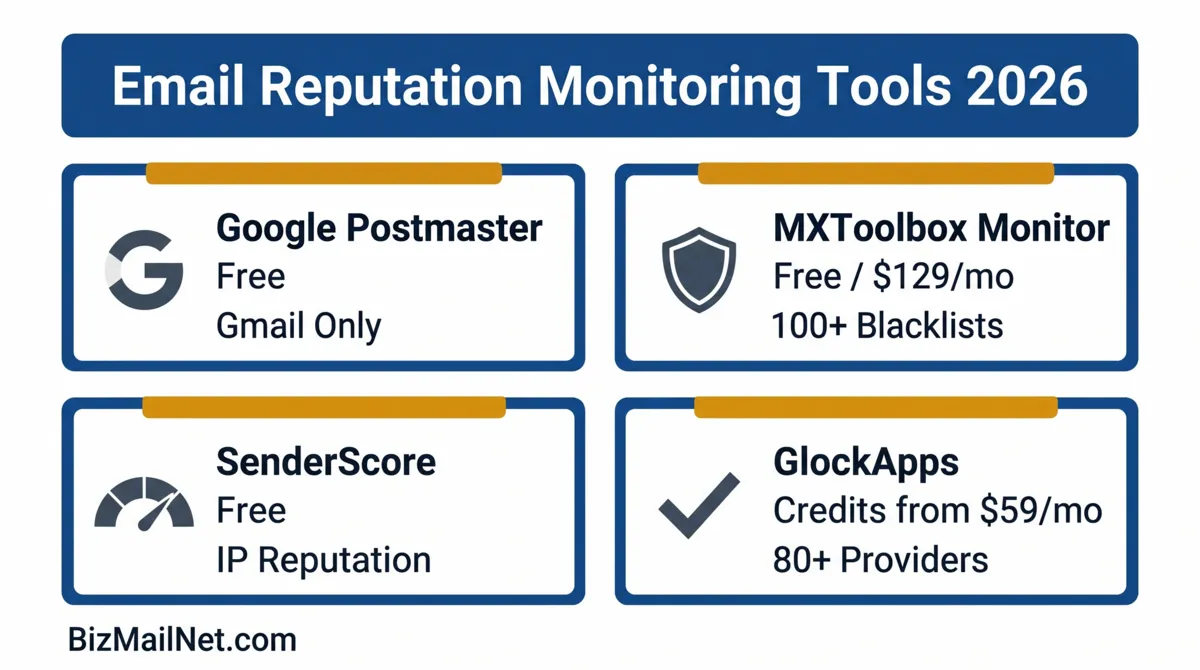
Postmaster Tools is the only source of inbox placement data specific to Gmail. It pulls telemetry directly from Google's internal systems and reports domain reputation, IP reputation, spam complaint rates, and delivery error data for your sending domain.
Setup
Go to postmaster.google.com. Sign in with a Google account. Click the plus icon to add a domain. Google provides a TXT record to add to your DNS to verify ownership. After verification, data begins populating once your sending volume reaches the threshold Google requires for the dashboard to generate statistics. Low-volume senders may see "Not enough data" for several metrics until volume increases.
What Each Metric Means
Domain reputation: Rated High, Medium, Low, or Bad. High means the domain consistently sends mail Gmail users want. Bad means the domain is being filtered at the algorithmic level regardless of content or authentication status. Moving from Low back to Medium typically takes two to four weeks of clean, engaged sending to the most active segments of the list.
Spam rate: The percentage of mail Gmail users are marking as spam. Keep this below 0.1% for optimal placement. Above 0.3%, Gmail begins throttling. Above 0.5%, domain-level filtering applies. Check this after every campaign send, not just weekly.
Delivery errors: Shows rate codes for rejected or temporarily failed mail. A spike in 550 rejection codes indicates an authentication problem or an active block. 421 codes indicate temporary throttling, which resolves itself but signals the sending volume or frequency is too high for the current reputation level.
Third-Party Reputation Dashboards
Postmaster covers Gmail. Third-party tools cover the rest of the inbox provider landscape and aggregate data across providers that do not offer their own monitoring portals.
Validity Everest
Validity Everest provides the most complete sender certification and reputation tracking platform in the market. Sender Certification from Validity gives certified domains preferential treatment at Yahoo, AOL, Comcast, and other providers that participate in the program. Network Digital Marketing achieved a documented 99% inbox placement rate on three-million-subscriber weekly sends using Validity's Sender Certification combined with strict list hygiene. The limitation is entry cost: estimated $35,000 to $65,000 per year for enterprise contracts. Most SMBs do not need this level of infrastructure. Teams with lists above 500,000 contacts sending weekly at scale should evaluate whether the placement improvement justifies the cost.
Validity SenderScore
SenderScore is a free IP reputation score from 0 to 100 based on complaint rates, spam trap hits, and bounce data. Check it at senderscore.org. A score above 90 is clean territory. Between 70 and 89, watch for placement issues at some providers. Below 70, expect inbox placement problems at multiple providers. SenderScore is a data point, not a full monitoring solution. Check it monthly for shared IPs and weekly for dedicated IPs.
GlockApps
GlockApps combines seed list placement testing with reputation monitoring. Placement tests run before campaigns. Ongoing monitoring tracks reputation signals between sends. The credit-based model suits SMBs that need testing capability without a monthly commitment to a platform they may not use every week.
MXToolbox
MXToolbox monitors sending IPs and domains against 100+ blacklists and sends email alerts when a listing is detected. Free tier covers basic monitoring for one domain. Paid tiers add multiple domains and real-time alerting. Set this up before any other tool. A blacklist listing is the fastest way to go from normal inbox placement to zero opens, and MXToolbox is the fastest way to catch it.
Setting Up Real-Time Alerts
Monitoring without alerting requires someone to check dashboards proactively. Most teams do not. The goal is to have the monitoring system notify you of a problem rather than waiting for an open rate collapse to prompt investigation.
MXToolbox alerts: Set up domain monitoring for your primary sending domain and all marketing subdomains. Configure email alerts for any new blacklist listing. This is a free feature at the basic tier.
Google Postmaster: Postmaster does not send automated alerts natively. The workaround is to set a calendar reminder for weekly domain reputation review. Some teams build a simple script that checks the Postmaster API and sends a Slack notification if reputation drops below a threshold. The Postmaster API is available to Google Workspace accounts.
Platform complaint rate tracking: Most email platforms show complaint rate per campaign in the send report. Set an internal rule: if complaint rate exceeds 0.08% on any campaign, that segment is paused and reviewed before the next send. Do not wait for Postmaster to confirm a problem that the platform report is already showing.
Tool Comparison Matrix
Filter by team size and primary need to find the right starting point for your monitoring stack.
| Tool | Starting Price | Best For | Covers | Limitation |
|---|---|---|---|---|
| Google Postmaster | Free | All senders | Gmail reputation, spam rate, delivery errors | Gmail only. No data for Outlook or Yahoo. |
| MXToolbox Monitor | Free (basic) / $129/mo | All senders | 100+ blacklist monitoring, DNS alerts | No inbox placement data. Blacklist detection only. |
| SenderScore (Validity) | Free | All senders | IP reputation score 0-100 | IP-level only; does not show domain reputation or per-provider data |
| GlockApps | Credits from $59/mo | SMB to mid-market | 80+ provider placement testing, spam trigger analysis | Per-test cost adds up for high-frequency senders |
| Inbox Monster | Custom pricing | Mid-market to enterprise | Placement testing, engagement prediction, content scoring | Pricing not public; enterprise contract required |
| Validity Everest | $35k–$65k/yr est. | Enterprise / high volume | Sender certification, full reputation dashboard, ISP feedback loops | Entry cost prohibitive for most SMBs |
Complaint Rate Management
The complaint rate is the metric that matters most for inbox placement in 2026. Reputation algorithms now weight a user's decision to mark an email as spam as a stronger negative signal than most positive engagement events. A single campaign with a high complaint rate can take a domain from High reputation to Low in 48 hours.
Three actions reduce complaint rates without reducing list size. First, use clear sender identification in the From name. Recipients who do not recognize the sender name mark as spam at higher rates than those who do. Second, make the unsubscribe link prominent and functional. A one-click unsubscribe gives a recipient an alternative to the spam button. Third, suppress contacts who have not opened in 90 days before any high-volume send. Sending to cold contacts on a list with healthy active subscribers dilutes the engagement signal and increases the complaint rate from the cold segment.
If complaint rate crosses 0.08% on any campaign, pause sends to the segment responsible and investigate before the next campaign goes out. If the full list is generating complaints, run a re-engagement sequence before any further sends. The blacklist recovery guide covers the escalation path if complaint rates have already pushed the domain into active filtering. See the blacklist recovery guide for the full protocol.
FAQ: Email Reputation Monitoring Tools
Google Postmaster Tools is a free dashboard from Google that shows senders their domain reputation score, IP reputation, spam complaint rate, and delivery error data for Gmail. Go to postmaster.google.com, sign in, add your domain, verify ownership by adding a TXT record to your DNS, and wait for data to populate. Data appears once sending volume reaches the threshold Google requires for the dashboard to generate statistics.
Check Google Postmaster Tools weekly at minimum. High-volume B2B senders should check daily. The goal is to catch a reputation drop before it has been running for more than a few days. Early detection shortens the recovery window considerably.
SenderScore is a reputation score from 0 to 100 assigned by Validity to sending IP addresses based on complaint rates, spam trap hits, and bounce rates. A score above 90 is good. Between 70 and 89, deliverability issues may appear at some providers. Below 70, inbox placement problems are likely across multiple providers. SenderScore is independent of Google Postmaster and covers different providers and signals.
Sudden reputation drops are typically triggered by one of four events: exceeding the 0.3% spam complaint threshold at Gmail, hitting spam traps in an unclean list, a compromised sending account used to send phishing mail, or a sudden volume spike from a new IP. Review the send log for the 48 hours before the drop to identify the campaign or segment responsible.
Warm-up tools that generate artificial engagement between seed inboxes have declining effectiveness in 2026. Google and Microsoft have improved detection of synthetic engagement patterns. Tools built on real inbox networks rather than simulated engagement produce more defensible results. The most reliable reputation-building approach is a gradual volume ramp sending relevant content to a verified, engaged list.
Sources
- SQ Magazine. B2B Email Marketing Statistics. 2025. sqmagazine.co.uk
- Leadfeeder. B2B Email Marketing Guide. 2026. leadfeeder.com
- MarketBetter. B2B Email Deliverability Guide 2026. 2026. marketbetter.ai
- Validity. 2025 Email Benchmark Report. 2025. validity.com (vendor source)
- Validity. Network Digital Marketing Case Study. 2025. validity.com (vendor source)