How to Retarget Print Catalog Readers with Facebook Ads
Your printed catalog goes to a household. Three days later the recipient sees your Facebook ad referencing the exact offer from the catalog. Click-through rates on catalog retargeting campaigns run two to three times higher than cold audience ads because the physical piece already did the awareness work. Here is the exact setup.
Key Findings
- Facebook Custom Audience upload matches your mailing list to Facebook profiles. No QR code or landing page visit required from the recipient.
- The retargeting window for catalog recipients should be 21-30 days, matching the average 17-day physical retention period of direct mail.
- Ad creative that explicitly references the catalog outperforms generic brand ads served to the same audience.
- Split your mailing list before the campaign to create a holdout control group so you can measure incremental lift accurately.
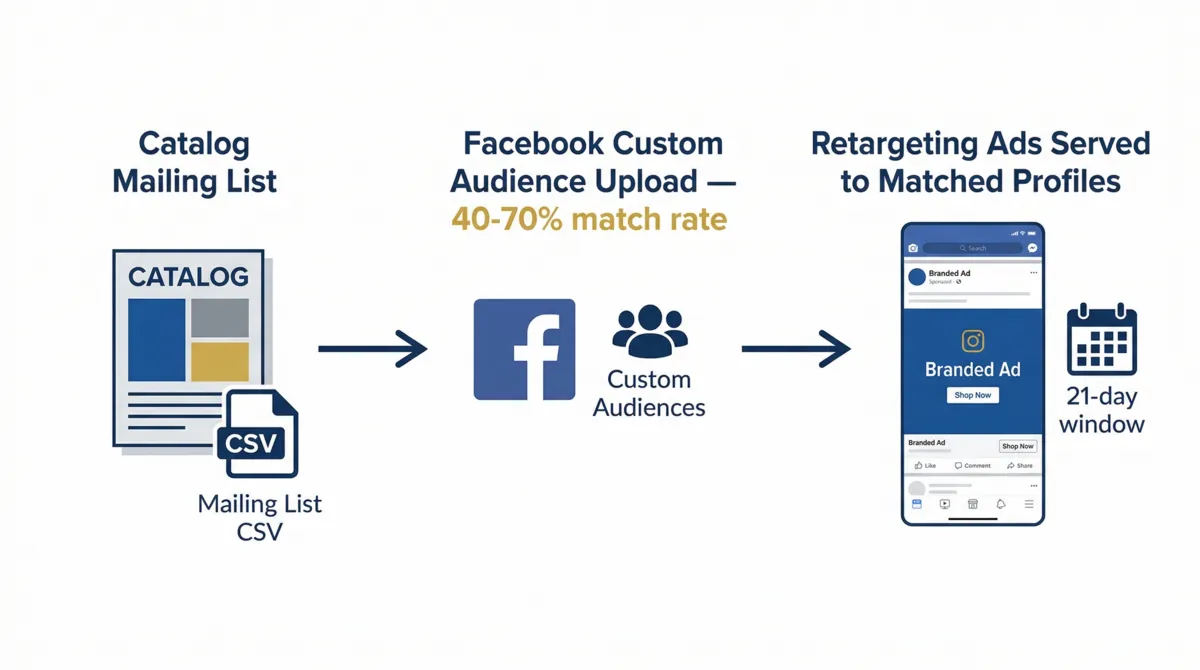
Why Print + Facebook Retargeting Works
A printed catalog commands 132 seconds of focused attention on average, compared to the seconds a digital ad gets before being scrolled past. That attention creates brand recall and purchase intent that decays over time if nothing follows it up digitally.
Facebook retargeting served to catalog recipients within the 21-day retention window catches them while the physical piece is still in the house and the offer is still fresh. The digital ad is not introducing the brand. It is reinforcing it. That is a fundamentally different and more effective use of ad spend than cold audience targeting.
This pairing also solves a persistent print attribution problem. When a catalog recipient visits your website directly without scanning a QR code or typing a vanity URL, that session shows up in GA4 as direct traffic. Running retargeting through Facebook lets you attribute that eventual conversion to the catalog drop through the Custom Audience match, even if the final click came from the Facebook ad. This is one piece of the full attribution picture covered in our offline and digital marketing integration guide.
Three Ways to Build the Retargeting Audience
Method 1: Mailing List Custom Audience Upload (Recommended)
Export your mailing list as a CSV with name, email, phone, and address columns. In Facebook Ads Manager go to Audiences, Create Audience, Custom Audience, Customer List. Upload the CSV. Facebook matches your list against its user profiles using email, phone, and name as identifiers. Match rates typically run 40-70% depending on how complete your contact data is.
This method requires no action from the recipient. The catalog does not need a QR code. You build the retargeting audience before the catalog even drops, schedule the ad campaign to launch on the estimated delivery date, and the ads start serving automatically.
Method 2: Landing Page Pixel Audience
Print a QR code or vanity URL on the catalog that routes to a dedicated landing page. Install the Facebook Pixel on that page. Anyone who visits the landing page enters the pixel-based retargeting audience. This method requires recipient action but produces a higher-intent audience: these are people who both received the catalog and took a step toward it digitally.
Method 3: IP Targeting Services
Services like PostcardMania's Everywhere Small Business product match physical mailing addresses to IP addresses and device IDs, then serve ads directly to those household devices across Facebook, Google, and display networks. This bypasses the email match requirement entirely and can reach households not in your email database.
Facebook Ads Setup Step by Step
- 1Prepare your mailing list CSVInclude at minimum: first name, last name, email, phone, zip code. More matching fields improve match rate. Remove any contacts who have unsubscribed or opted out of marketing.
- 2Upload to Facebook Custom AudiencesAds Manager, then Audiences, Create Audience, Custom Audience, Customer List. Map your CSV columns to Facebook's identifiers. Facebook hashes the data before uploading.
- 3Set the campaign start dateSchedule the campaign to begin on the estimated in-home delivery date, not the mail drop date. First Class mail delivers in 3-5 days; Marketing Mail in 5-10 days.
- 4Set the campaign end dateRun for 21-30 days from delivery. Running beyond 30 days drops into cold-audience territory where the catalog is unlikely to still be present.
- 5Create a Lookalike AudienceOnce your Custom Audience is built, create a 1-2% Lookalike Audience from it. This expands your reach to Facebook users who share characteristics with your catalog recipients.
Ad Creative That Connects to the Physical Piece
The most common mistake in catalog retargeting is running the same generic brand creative to the mailing list audience that you run to cold traffic. The Custom Audience already knows your brand from the physical piece. What they need is a reason to act digitally now.
- Explicit reference: "You received our spring catalog. Here's the offer inside." Direct link to the relevant product page or dedicated landing page.
- Urgency extension: "The catalog offer expires Friday." Using the ad to create a deadline that the static printed piece cannot provide.
- Digital-only add-on: "Show this ad at checkout for an additional 10% off your catalog order."
- Video walkthrough: A short video showing the catalog's key products in use, providing motion and audio that the static print cannot deliver.
Measuring the Combined ROI
To isolate the value of adding Facebook retargeting to a print campaign, split your mailing list into two groups before the drop: a retargeted group uploaded to Custom Audiences, and a holdout control group mailed but not retargeted. Compare conversion rates between the two groups over the campaign window. The lift from the retargeted group minus the Facebook ad spend is the incremental ROI of the digital layer.
Tag all landing page URLs referenced in the catalog with utm_medium=offline&utm_source=catalog. Tag Facebook ad URLs with utm_medium=paid_social&utm_source=facebook. GA4 then shows both the direct catalog traffic and the retargeted Facebook traffic as separate sources.
For attribution that captures conversions with no trackable link at all, see QR Code Tracking: Measuring Physical Signage With Analytics for the same tracking setup applied to signage and banners.
FAQ
Yes, using three methods: uploading your mailing list as a Custom Audience in Facebook Ads Manager, using QR code landing page visitors as a pixel-based retargeting audience, or using IP targeting services that match physical addresses to device IDs. The mailing list upload is the most direct and requires no tracking setup on the physical piece.
Run retargeting ads for 21 to 30 days after estimated in-home delivery. Direct mail stays in households for an average of 17 days and is revisited multiple times. The window should match that retention period, not the 7-day window typically used for website visitor retargeting.
Reference the physical catalog explicitly. Creative that says "Seen our catalog? Here's the offer inside" consistently outperforms generic brand ads served to the same audience. The recipient recognizes the connection between the physical piece and the digital ad, which increases click-through rate and conversion intent.
Split your mailing list into a retargeted group and a holdout control group before the campaign. Compare conversion rates between the two groups over the campaign window. The lift from the retargeted group minus the Facebook ad spend gives you the incremental ROI.
Sources
- Postalytics. Direct Mail Trends & Statistics for 2025. 2025. postalytics.com
- Sanky Communications. 20 Ways to Integrate Your Direct Mail and Digital Fundraising. 2023. sankyinc.com