QR Code Tracking: Measuring Physical Signage With Analytics
A dynamic QR code on a sign costs nothing extra to print. What it gives you: scan count by day and time, device type, UTM-tagged sessions in GA4, and conversion attribution to the specific sign. Here is the full setup for turning physical signage into a trackable marketing channel.
Key Findings
- Dynamic QR codes let you update the destination URL after a sign is printed. Critical for signage that stays up for months while campaigns change.
- UTM parameters on the QR destination URL route scans into GA4 as a distinct, trackable traffic source separate from organic or direct.
- GA4 custom channel groups stop scan traffic from landing in the Unassigned bucket where it becomes invisible.
- Separate UTM source values per sign location let you compare performance across multiple physical placements from one dashboard.
Static vs Dynamic QR Codes: Why It Matters for Signage
Static QR codes encode the destination URL permanently into the image at the moment of generation. Print the sign, and the URL is locked in. If the landing page URL changes, the offer expires, or you typed the URL wrong, the only fix is reprinting the sign. For a window sign, outdoor banner, or trade show display that stays up for six months, it is a serious operational risk.
Dynamic QR codes work through a redirect layer. The QR image encodes a short redirect URL that the platform controls. You can update the destination URL in the platform dashboard any time without touching the printed sign. For signage, dynamic is always the right choice. The cost difference is a monthly platform fee, typically $5 to $20 per month for small business plans.
The same dynamic QR setup described here applies to print catalogs and direct mail. For that application, see How to Retarget Print Catalog Readers with Facebook Ads.
UTM Parameter Setup for Signage QR Codes
The destination URL inside your dynamic QR code needs UTM parameters. Without them, GA4 sees the scan as a direct visit with no source attribution.
https://yoursite.com/offer?utm_medium=offline&utm_source=storefront_window&utm_campaign=spring_2026
// Trade show banner
https://yoursite.com/offer?utm_medium=offline&utm_source=trade_show_banner&utm_campaign=expo_april_2026
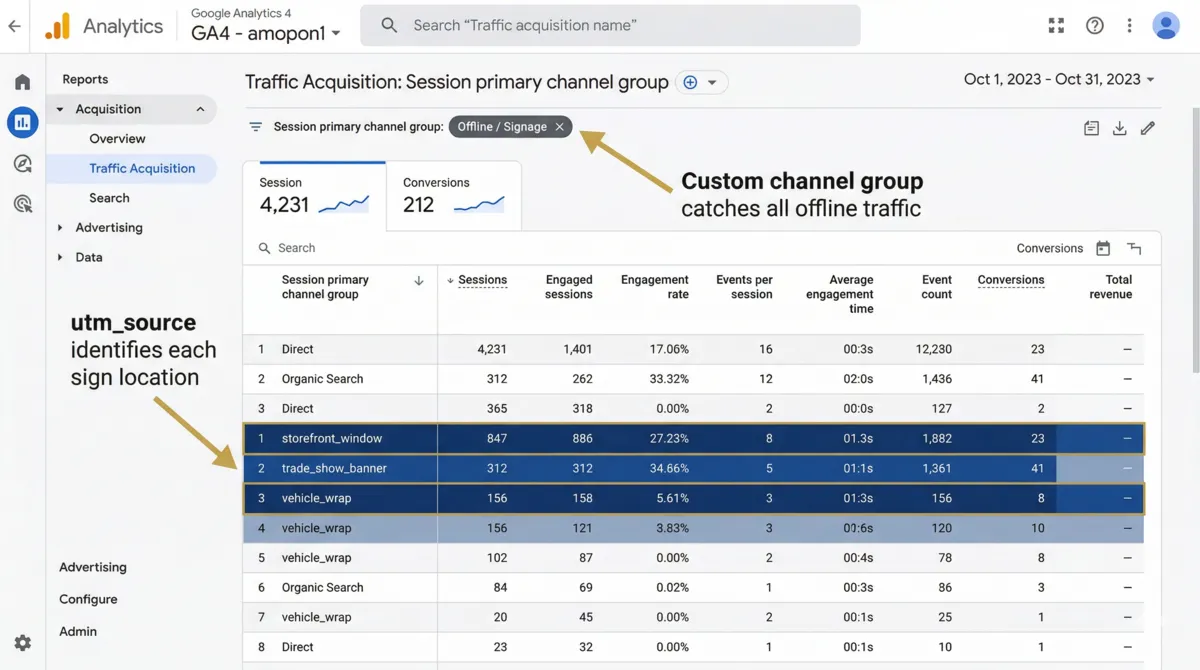
Using utm_medium=offline consistently across all physical channels allows GA4 to group all offline traffic together in a single custom channel. Each utm_source value identifies the specific physical placement.
Storefront_Window and storefront_window as different values. Establish a naming convention before your first campaign and apply it consistently.
GA4 Configuration for Offline Signage Traffic
- 1Create a custom channel groupGA4 Admin, then Data Display, then Channel Groups, then New Channel Group. Add a channel named "Offline / Signage." Set the condition: Medium exactly matches "offline." GA4 takes 24-72 hours to apply the new channel retroactively.
- 2Verify the channel is catching trafficIn GA4 Reports, Acquisition, Traffic Acquisition, change the primary dimension to "Session default channel group." After your first QR scan arrives, you should see "Offline / Signage" appearing. If it shows Unassigned, check that your UTM medium is spelled exactly "offline" with no capitals.
- 3Mark landing page completions as key eventsIf your QR code routes to a landing page with a form or purchase, mark that completion event as a Key Event in GA4 Admin, Data Display, Events. This connects the QR scan to a conversion in the acquisition reports.
- 4Build an Exploration report by sourceIn GA4 Explore, create a free-form report with Session Source as the dimension and Sessions plus Key Events as metrics. This shows each sign location as a separate row with its own conversion data.
Signage Applications and QR Placement Strategy
Retail Storefront Windows
Window signs with QR codes work best when they offer something the passerby cannot get by simply walking in: an exclusive digital offer, early access to a sale, or a detailed menu and catalog. Scan rates increase when the QR code includes a short text prompt explaining what happens when it is scanned.
Trade Show Displays and Banners
Trade show banners with QR codes route attendees who pass by but do not stop to a digital landing page where they can learn more at their own pace. Tag these with utm_source=tradeshow_banner to separate passive banner traffic from active badge scans in your CRM.
Vehicle Wraps and Outdoor Signage
QR codes on vehicle wraps are scanned primarily when the vehicle is stationary. Short vanity URLs work better than QR codes alone here because the scan window is brief. Combine both: print the vanity URL and a QR code so people can type the URL later and still be attributed correctly.
Point of Sale and In-Store Displays
QR codes on shelf displays or counter cards route customers to review pages, how-to videos, or loyalty program sign-ups. Tag each display location separately to identify which product areas drive the most digital engagement.
Reading the Data: What to Look For
Two data streams are available: the QR platform's own scan analytics and GA4's session and conversion data. The QR platform shows scans, the moment someone's camera reads the code. GA4 shows sessions, the moment someone lands on the destination page.
The gap between scans and sessions reveals how many people scanned but did not complete the page load. A large gap on a specific sign suggests the landing page is not loading fast enough on mobile.
High scans with low conversions points to a landing page problem. Low scans with high conversions points to a placement that reaches a more qualified audience. For the broader attribution picture connecting sign-driven sessions to overall campaign ROI, see our offline and digital marketing integration guide.
FAQ
Static QR codes permanently encode the destination URL. Any change requires reprinting the sign. Dynamic QR codes point to a redirect URL you control — update the destination any time without touching the printed sign. For any signage that stays up longer than a single campaign, dynamic is always the right choice.
Use UTM parameters on the destination URL. Set utm_medium=offline and utm_source to identify the specific sign or location. In GA4, create a custom channel group where Medium exactly matches "offline." Each QR scan then appears as a distinct traffic source with full conversion tracking attached.
Yes. Use utm_source to identify the location, for example utm_source=storefront_window. Each sign gets a unique UTM source value. In GA4 Explore, set Session Source as the dimension to see each sign location as a separate row with its own data.
QR Tiger and Beaconstac both offer dynamic QR codes with scan analytics at accessible price points. Lob is the better choice if you are already using their direct mail platform. Avoid free static QR generators for any signage you plan to track.
Sources
- Postalytics. Direct Mail Trends & Statistics for 2025. 2025. postalytics.com