Trade Show Lead Nurture: The 5-Email Sequence That Closes Deals
Leads contacted within 24 hours of a trade show scan are seven times more likely to convert than those contacted later. Gushwork, 2026 Most companies wait until the following week. This is the exact email sequence, with timing, subject lines, and content, that closes deals before your competitors send their first follow-up.
Key Findings
- Hot leads need a personalized email within 1 hour of the badge scan, not after the event ends, not the next morning.
- Segment every lead as Hot, Warm, or Cold at the time of scan. The sequence content differs significantly by segment.
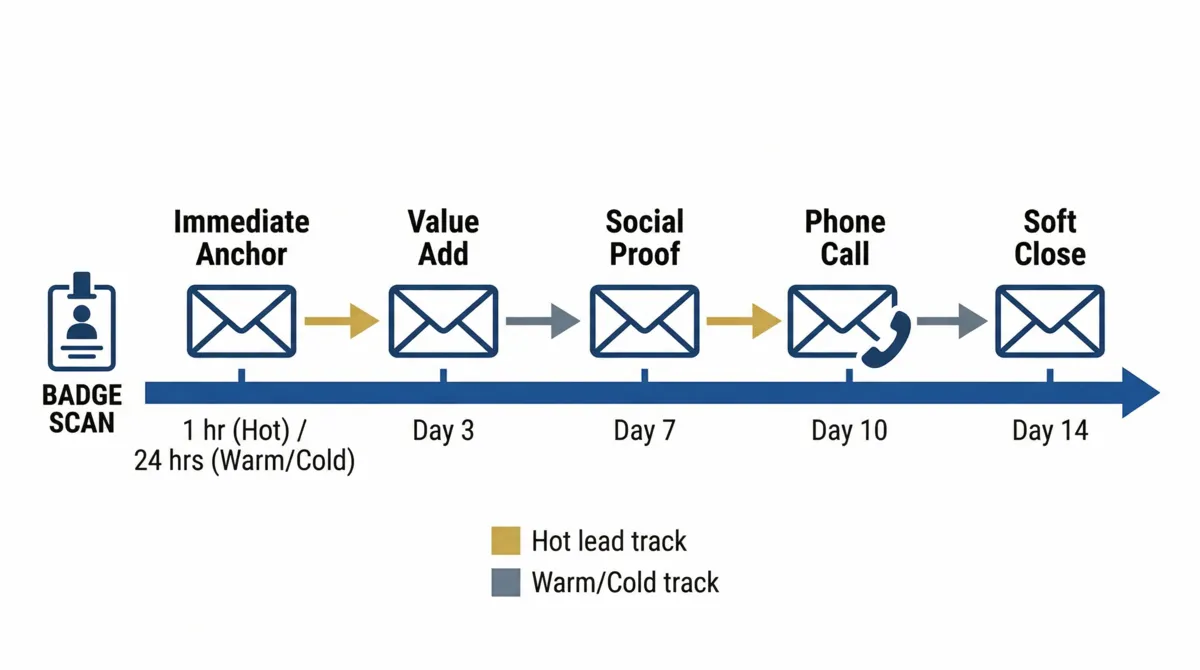
- Five emails over 14 days is the standard cadence. Sending more in a compressed window triples unsubscribe rates.
- The sequence must be built in your CRM and tested before the event, never assembled manually after you return.
Why Most Trade Show Follow-Ups Fail
The B2B marketing community documented the problem clearly: "$18k all in when you add up booth fees, travel, and staff time. Every time we come back with a stack of badge scans and the follow-up sequence goes nowhere. Reply rates are near zero. The contacts are real but they're cold as hell." r/b2bmarketing, 2026
Three things kill trade show follow-up conversion. First: delay. Interest from a badge scan decays within 48 hours. Second: generic messaging. Sending every contact the same "great to meet you" template signals automation rather than genuine follow-through. Third: no segmentation. A prospect who asked for a demo is not the same as someone who scanned your badge while walking past. For the broader context on why physical event leads need digital follow-up systems, see our offline and digital marketing integration guide.
Hot, Warm, Cold Segmentation at the Booth
Segment every contact at the moment of scan, not back at the office. Your lead capture app should have a tagging system. Use it in real time.
Hot Lead
Named a specific pain point. Asked for pricing. Requested a demo. Defined a buying timeline. These contacts need a manual, personalized email within one hour of the scan. The email references the exact conversation. The CTA is a direct booking link for the promised next step.
Warm Lead
Engaged in a real conversation. Expressed genuine interest but no immediate urgency, no defined budget, no specific timeline. These contacts enter the automated sequence. The first email goes within 24 hours. Content is useful and non-pushy, a resource that addresses something they mentioned in the conversation.
Cold Lead
Brief badge scan with no substantive conversation. Little to no expressed interest. These contacts get the same automated sequence as warm leads but should move to long-term CRM nurture after Day 14 without a response. Do not invest manual follow-up time here.
The 5-Email Sequence
Email 1: The Immediate Anchor
Hot leads: Send within 1 hour of badge scan. Manual, personalized. Reference the specific problem discussed. Single CTA: a booking link for the demo or call they requested. Under 150 words.
Warm and cold leads: Send within 24 hours. Automated but contextualized. Offer one useful resource, not a sales pitch. Frictionless CTA. Under 150 words.
Email 2: The Value Add (Day 3)
Send to all segments. Add something new: a data point, a short case study, or a secondary benefit your product wins on. Give a different subject line angle and different content from Email 1. CTA remains soft: "Would a 15-minute call be useful this week?"
Email 3: The Social Proof (Day 7)
A customer story directly relevant to the pain point the prospect expressed at the booth. One paragraph on the scenario, one paragraph on the outcome, one CTA. This email should feel like a colleague sharing something genuinely useful, not a marketing email.
Email 4: The Auditory Touchpoint (Day 10)
Email plus a phone call or voicemail on the same day. The email is short: "I left you a voicemail today. Happy to connect whenever works for you." For hot leads who have not responded, this is often the touchpoint that converts.
Email 5: The Soft Close (Day 14)
The final email in the active sequence. Drop the sales pressure. Offer something genuinely useful and close with a low-friction door-opener: "If the timing isn't right, no problem. I'll reach back out in a few months." Move all non-responders to a long-term nurture sequence.
Subject Line Templates by Segment and Email
| Hot Lead Subject Lines | Warm / Cold Subject Lines | |
|---|---|---|
| Email 1 | "The [topic] we discussed at [Event]" | "Following up on our [Event] conversation" | "Resources from [Event] — [Company]" | "Great meeting you at [Event]" |
| Email 2 | "One more thing from [Event]" | "Quick follow-up — [specific benefit]" | "Thought this might be useful after [Event]" |
| Email 3 | "How [Similar Company] solved [pain point]" | "What happened when [company type] tried this" |
| Email 4 | "I left you a voicemail" | "Tried you by phone today" | "I left you a voicemail" | "Tried you by phone today" |
| Email 5 | "Checking in one last time" | "Leaving the door open" | "Before I sign off" |
Keep all subject lines under 50 characters for mobile. Never use the event name alone as a subject line, as it reads as a mass blast.
CRM Automation Setup
The sequence above requires the CRM workflow to be built before the event, not assembled from notes on the plane home.
- 1Connect badge scanner to CRMBlinq and Mobly both offer native HubSpot and Salesforce integrations. Configure the connection before the show. Test with a dummy scan. Verify the contact record appears in the CRM within 60 seconds of the scan.
- 2Create three enrollment triggersOne sequence per segment: Hot, Warm, Cold. The enrollment trigger is the CRM tag applied at scan time by the sales rep in the lead capture app.
- 3Build the suppression logicAny contact who replies, clicks a booking link, or converts should be automatically unenrolled from the active sequence and moved to a "Post-Conversion" workflow.
- 4Schedule the LinkedIn connectionAdd a manual task on Day 3 for the sales rep to send a LinkedIn connection request to all hot and warm leads. A personal connection request converts better than an automated one.
FAQ
Hot leads should receive a personalized email within 1 hour of the badge scan, not after the event ends. Warm and cold leads should receive an automated email within 24 hours. Leads contacted within 24 hours are seven times more likely to convert than those reached later.
Five emails over 14 days. Email 1 within 1-24 hours, Email 2 at Day 3, Email 3 at Day 7, Email 4 at Day 10 with a phone call on the same day, Email 5 at Day 14 as a final soft close. Anyone who replies or converts should be suppressed from the remaining sequence immediately.
Reference the specific event and specific conversation. "The [topic] we discussed at [Event Name]" for hot leads. "Resources from [Event Name]" for warm and cold leads. Keep subject lines under 50 characters for mobile. Never use the event name alone.
Connect your badge scanning app to your CRM via API or Zapier before the event. When a badge scans and a Hot/Warm/Cold tag is applied, the contact enrolls in the corresponding sequence automatically. The sequence must be built and tested before the event, not assembled after you return.
Sources
- Gushwork. Why Trade Show Leads Die After Events and What You Can Do to Fix It. 2026. gushwork.ai
- Reddit — r/b2bmarketing. Trade show ROI has been basically zero for us three years running. 2026. reddit.com