How to Clean Unengaged Email Subscribers Without Losing Revenue
Most deliverability guides tell you to delete unengaged subscribers after 90 days. That rule was built for e-commerce, where a buyer who hasn't purchased in three months has almost certainly moved on. Apply the same rule to a B2B list and you are deleting buyers who are mid-evaluation, mid-approval process, or mid-budget cycle. The 90-day clock and the 10-month buying cycle are not compatible, and which one you follow determines whether list hygiene protects your pipeline or destroys it.
Key Findings
- The average B2B buying cycle runs over 10 months. Standard 90-day automated deletion rules remove active buyers from marketing lists before a purchase decision is reached. (HubSpot, 2026)
- Reactivating an inactive subscriber costs five times less than acquiring a new lead. Deletion is the most expensive list hygiene decision a team can make when suppression achieves the same deliverability benefit. (Prospeo, 2026)
- Sending to unverified, decaying lists produces bounce rates of 35–40%. A single campaign into an uncleaned list can set domain reputation back 60 days or more. (Prospeo, 2026)
- Professional email validation costs $0.003 to $0.01 per address. For a 10,000-contact list, the total validation cost is $30 to $100. The cost of skipping it is months of recovery from a damaged sender score. (Nutshell, 2026)
The Sunsetting Myth: Why 90-Day Deletion Rules Kill B2B Pipeline
The 90-day sunsetting rule has a defensible origin. Inbox providers use engagement signals to determine where mail gets routed. A large segment of non-openers drags down the average engagement rate for the entire sending domain, which over time pushes all mail from that domain toward spam or promotions. Removing those contacts improves the ratio of engaged to disengaged recipients, which protects the sender score for the contacts who are genuinely paying attention.
The problem is the timeframe, not the logic. 90 days was calibrated for consumer purchasing behavior. Someone who hasn't clicked on a fashion retailer's emails in three months has probably stopped buying from that retailer. That inference does not hold in B2B. A procurement manager who signed up for a software vendor's newsletter in January may not be in an active evaluation until October. Between January and October, they may open nothing. They are not gone. They are waiting.
The deliverability team sees a list full of non-openers and wants to cut. The sales team sees leads acquired at real cost who are not ready to be discarded. Both concerns are legitimate. The deliverability problem is real. So is the pipeline risk. Suppression is how you honor both: the contact drops off broadcast sends, stops generating reputation damage, and stays in the system for a lower-frequency re-engagement attempt when the timing makes more sense.
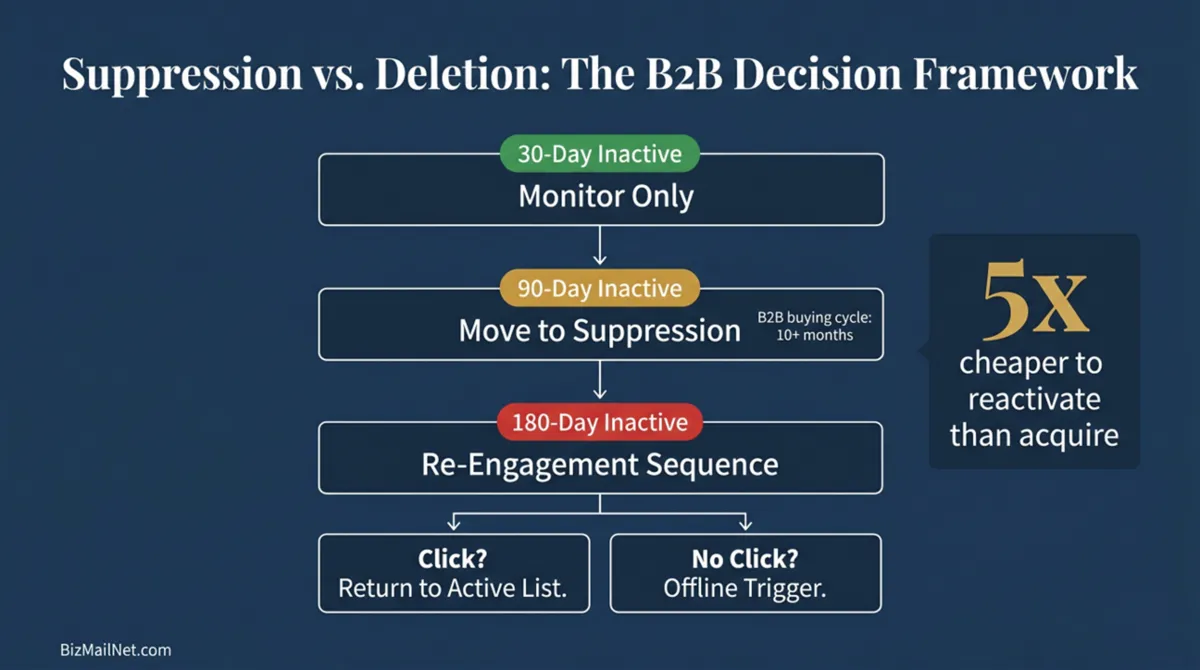
That path from broadcast to suppression to re-engagement to deletion produces better outcomes than immediate deletion because it takes the reputation-damaging sends off the table without permanently discarding contacts whose buying cycle simply has not reached activation yet. The full list cleaning cadence by business type is in the pillar guide.
Classifying Inactivity: The 30-Day, 90-Day, and 180-Day Tiers
Treating inactivity as a binary (active or not) is where most list hygiene decisions go wrong. A contact silent for 25 days is a different situation from one silent for six months, and applying the same response to both either damages pipeline or leaves reputation-dragging dead weight on the list. Three tiers, three different responses.
30-Day Inactive: Monitor Only
One month of no engagement is not a meaningful signal. Vacation, budget freeze, Apple Mail Privacy Protection suppressing the tracking pixel. Any of these can produce a 30-day gap in someone who is still very much a real prospect. Leave these contacts in the active broadcast list. Hard bounce during the window? Move them to suppression immediately, regardless of prior history. Otherwise, watch and wait.
90-Day Inactive: Move to Low-Frequency Suppression
Ninety days of no opens, no clicks is a sustained signal. Continuing to send at full broadcast frequency is doing active damage without necessarily meaning the contact is continuing to send to them at full broadcast frequency is doing active damage. Move them to a low-frequency suppression segment. Off the weekly list. One email per month or a quarterly touchpoint is enough to stay present without generating the negative pattern that triggers spam folder routing.
For B2C and e-commerce contacts, this is also a reasonable trigger for a re-engagement sequence. For B2B contacts, hold off until 180 days. At 90 days they may still be mid-evaluation, and a win-back sequence framing a relationship that is not yet over can do more harm than good.
180-Day Inactive: Run the Re-Engagement Sequence
Six months with no engagement, no bounce, no unsubscribe. The contact is not generating any signal at all. Time to find out if they are still reachable. A structured three-email sequence over two to four weeks is the last deliberate attempt before an archive or deletion decision gets made.
A click on anything in the sequence brings the contact back to the active list. Reset the 30-day monitoring window and move on. No click across all three emails means the archive or deletion decision has been earned honestly: a dedicated outreach attempt ran, nothing came back. Flag the record for offline follow-up if a physical address is available, then make the call.
Hard Bounces, Soft Bounces, and Spam Traps: What Each Costs You
Most platform dashboards report bounces as one number. Hard bounces, soft bounces, and spam traps each damage sender reputation in different ways and need different responses. Treating them identically leads to over-deletion of addresses that would have resolved on their own, or under-deletion of spam traps that are quietly poisoning domain reputation because they look like soft bounces.
Hard Bounces
Hard bounces are permanent. The address is gone: deactivated, domain invalid, or permanently blocked by the receiving server. One occurrence is enough. Move it to suppression immediately. Sending to a known hard bounce a second time violates most platform terms of service and will trigger account review.
Employee turnover drives most B2B hard bounces. A contact who leaves a company typically has their email deactivated within 30 days. A list that has not been validated in 12 months will have a meaningful share of B2B addresses that went dead somewhere in that window. Running validation before a campaign catches them before they bounce on an actual send.
Soft Bounces
Soft bounces are temporary. The address exists, but the message did not get through this time: full inbox, server overload, message too large, daily receiving cap. One soft bounce is noise. Three consecutive soft bounces across separate sends means the address is functionally unreachable, even if it technically still exists.
Most major platforms track soft bounce accumulation automatically and suppress after a threshold. Check what yours is set to. Some default to suppressing after the first soft bounce, which cuts too early and removes addresses that would have resolved on their own. Three consecutive bounces is the defensible standard.
Spam Traps
Spam traps are the most damaging contact type and the hardest to detect. Recycled traps were once legitimate addresses that got abandoned, deactivated, then reactivated by inbox providers specifically to catch senders who are not cleaning their lists. Hitting them signals that your database contains addresses old enough to have cycled through that process, which is a list maintenance problem. Pristine traps were never owned by anyone. They get planted in scraped contact lists and purchased data sets to identify senders using non-consent-based acquisition. Hitting one sends an immediate signal to the inbox provider, and the domain reputation damage can persist for months.
No email platform's built-in bounce handling detects spam traps before they are hit. Detection requires either pre-send validation through a third-party tool with a spam trap database, or post-send analysis of unusual bounce patterns. Pre-send validation is the only approach that prevents the reputation damage rather than documenting it after the fact.
Validation APIs: What to Run Before Any Deletion Decision
Teams that treat deletion as the cleaning step are starting at the wrong end. Deletion is the last step. Validation is the cleaning step, and running it before any deletion decision prevents two distinct errors: removing valid addresses that only appear inactive because of open tracking failures, and keeping addresses that look valid but are spam traps or role-based inboxes generating quiet damage.
Third-party validation tools check addresses against multiple data sources before a send ever happens. The major tools used in 2026 for SMB list management are NeverBounce, ZeroBounce, and Kickbox. All three operate on a similar model: upload a CSV of addresses or connect via API, and the tool returns a classification for each address.
Address Classification Categories
Valid addresses get sent to normally. Invalid addresses (non-existent domain, deactivated mailbox) go straight to hard bounce suppression before the send goes out. Risky addresses technically exist but show signals associated with poor engagement: catch-all domains that accept everything regardless of whether the mailbox is real, disposable email services, or addresses with high historical complaint rates. For cold campaigns, exclude them. For existing subscribers who previously engaged, one re-engagement attempt may still be worth running.
Role-based addresses (info@, support@, hello@, contact@) are their own category. They route to a shared inbox that multiple people manage, with high turnover and a low tolerance for commercial email. People who never personally opted in are far more likely to hit spam than unsubscribe. Remove them from personalized and promotional campaigns. If the address belongs to a real customer contact, shift the relationship to a named individual.
Disposable addresses were created through a temporary email service and will expire or stop accepting mail. Remove them immediately. They were almost always used to access gated content with no intention of receiving email afterward.
Point-of-Capture Validation
Batch validation of an existing list is a cleanup operation. The more cost-effective long-term approach is API-connected validation at the point of capture, where new addresses are checked before they enter the database at all. Every major validation tool provides a real-time API that integrates with form builders, landing page tools, and CRM intake forms.
Point-of-capture validation prevents the three most common sources of list decay from entering the system: typos on signup forms ([email protected] instead of [email protected]), role-based addresses entered to bypass required-field validation, and disposable addresses used to access lead magnets. Catching these at entry costs the same $0.003 to $0.01 per address as batch validation, but eliminates the accumulated damage of mailing invalid addresses for months before a batch audit catches them.
Run a full batch validation pass before any bulk deletion decision. An address that appears dormant (no opens in 180 days) may still be a valid, reachable address whose owner has open tracking disabled in Apple Mail. Deleting it based on engagement data alone removes a reachable contact. Validating it first confirms whether the address is genuinely unreachable before the deletion decision is made.
Suppression Workflows by Platform
Every major email platform handles suppression differently. The mechanics vary enough that a suppression decision made in one platform does not automatically carry over when migrating to another, and the default suppression settings in most platforms are not calibrated for B2B buying cycles. Below are the correct suppression workflows for the four platforms most commonly used by SMBs.
Klaviyo
Klaviyo uses a combination of profiles, segments, and suppressed status. A contact whose profile is suppressed is excluded from all flows and campaigns but remains visible in the account. To suppress a contact manually, navigate to their profile and select Suppress. For bulk suppression of an unengaged segment, build a segment with the criteria "Has not opened email in the last 180 days AND has not clicked email in the last 180 days AND is not suppressed," export the list, and use the Suppress Profiles bulk action.
Klaviyo's At-Risk and Lapsed segments in the built-in Customer Lifecycle segmentation tool provide a starting point for identifying contacts who need suppression review. At-Risk covers customers who purchased between 12 and 24 months ago with no recent activity. Lapsed covers those beyond 24 months. Both are worth reviewing quarterly against your suppression criteria.
One important billing note: Klaviyo's pricing is based on active profiles. Suppressed profiles do not count toward the billable contact tier. Running a suppression pass before the billing cycle renewal reduces the invoice while improving domain reputation.
Mailchimp
Mailchimp uses audience status fields: Subscribed, Unsubscribed, Non-Subscribed, and Cleaned. Cleaned contacts are those Mailchimp has automatically removed due to hard bounces or spam complaints. You cannot send to Cleaned contacts and they do not count toward the contact limit.
For strategic suppression of unengaged contacts who are not yet bouncing, the correct Mailchimp approach is to use Tags and Groups to move contacts to a low-frequency segment, then exclude them from regular campaigns by audience filtering. Mailchimp does not have a native "suppression" status for contacts who are still technically valid but strategically excluded. The workaround is creating a dedicated audience or tag called something like "Low Frequency" and excluding it from all standard campaigns while running occasional re-engagement sends to that tag only.
A warning specific to Mailchimp's pricing model: unlike Klaviyo, Mailchimp charges for all contacts in the audience regardless of subscription status, with the exception of Unsubscribed contacts (which are stored but not billed). Contacts tagged as Low Frequency or strategically excluded still count toward the contact tier. Cleaning contacts by archiving them removes them from the billing count.
Brevo
Brevo uses a Blocklist feature for suppression. Adding a contact to the blocklist prevents all marketing and transactional email to that address. For strategic suppression of unengaged B2B contacts who should still receive occasional touchpoints, blocklist is too aggressive. The correct approach in Brevo is to create a dedicated list called something like "Low Engagement" and set up a separate campaign cadence for that list at reduced frequency (monthly rather than weekly).
Brevo's pricing is based on email send volume rather than contact count, which means storing suppressed contacts costs nothing extra on the monthly invoice. This structural difference makes Brevo more forgiving of large suppressed segments than contact-count platforms like Mailchimp or Klaviyo.
ActiveCampaign
ActiveCampaign uses a combination of tags, contact status, and automation to manage suppression. A contact can be set to Unsubscribed status (which prevents all sends and is legally permanent), or managed through tags and list membership for strategic suppression. The recommended approach for unengaged B2B contacts is to create a tag called "Suppressed Low Engagement" and build an automation that removes any contact with that tag from all active campaign lists while keeping them in the CRM for sales follow-up.
ActiveCampaign's CRM integration makes it the strongest option for B2B teams where the suppressed contact list needs to remain visible to a sales team for manual outreach while being excluded from marketing automation. A contact suppressed from email sends can still appear in the CRM pipeline with full activity history, allowing a sales rep to make a direct phone or LinkedIn approach without the marketing automation continuing to flag the contact as unreachable.
| Platform | Suppression Method | Billing Impact | Carry Over on Migration |
|---|---|---|---|
| Klaviyo | Suppress Profile (bulk or individual) | Suppressed profiles excluded from active profile count | Must export and re-import suppression list manually |
| Mailchimp | Tag + campaign exclusion (no native suppression status) | Tagged contacts still count toward contact tier | Tags do not transfer; must re-apply in new platform |
| Brevo | Blocklist (hard) or dedicated low-frequency list (soft) | No impact (volume-based pricing) | Blocklist exportable; must re-import in new platform |
| ActiveCampaign | Tag + list removal with CRM retention | Contacts still billable unless fully deleted | Tags exportable; automation must be rebuilt in new platform |
Regardless of platform, one suppression rule applies universally: any contact who unsubscribed through any channel must be on the global suppression list and must never be re-added, even during a platform migration or a new import from an external data source. Suppression lists must be exported before any migration and re-imported into the new platform before the first send. Platforms do not transfer this data automatically.
What to Do With Suppressed Contacts Offline
Being suppressed from digital sends is not the same as being gone. The contact is off your broadcast list because continued sends damage sender reputation. That is a technical decision about where to route messages, not a verdict on whether the relationship is worth preserving.
For B2B contacts and any subscriber with a physical address on file, suppression from digital sends is a trigger for offline follow-up, not a signal that the relationship is over. A postcard or printed catalog sent to a physical address is completely unaffected by inbox algorithms, spam complaint rates, or open tracking failures. It reaches the desk regardless of whether the recipient has been flagging marketing email as spam for six months.
After moving a contact to the 180-day suppression tier, and before running the re-engagement email sequence, check whether the contact record includes a physical address or whether one can be appended through a data broker. Direct mail vendors including Taradel, PostcardMania, and Lob all provide address appending that matches email records against physical address databases.
Once physical addresses are appended for eligible suppressed contacts, flag them for a direct mail touchpoint timed alongside the first email in the re-engagement sequence. A contact who receives both a postcard and a re-engagement email in the same week is getting two independent impressions from two separate channels. The physical piece reinforces the digital one and provides a tangible anchor (a URL, a QR code, a promo code) that can be tracked back to the campaign in GA4 through a matchback model.
Contacts who complete the digital re-engagement sequence without a click but have received a physical touchpoint should be kept in the suppressed digital segment for an additional 60 days to allow the direct mail impression time to drive a visit. A contact who visits the site within 60 days of a physical touchpoint, even without clicking the re-engagement email, is a reactivated contact for attribution purposes.
Contacts with no response across both channels after the full sequence are done. Two digital attempts and one physical pass have been made. Archive the record and move on.
The vendors that handle triggered direct mail at SMB scale, including address appending and matchback attribution, are reviewed in the direct mail vendor directory. For CAN-SPAM and CASL rules governing how long you can retain suppressed contact data, the CAN-SPAM and CASL opt-out rules guide covers the jurisdiction-specific requirements.
Engagement Threshold Calculator
Enter your average sales cycle, list type, and current send frequency. The calculator outputs a custom suppression window calibrated to your business model, preventing premature deletion of contacts who are still within a realistic consideration period.
FAQ
The correct window depends on your business model and average sales cycle. For B2C and e-commerce, moving contacts to a suppression segment at 90 days before any deletion is defensible. For B2B, where average buying cycles exceed 10 months, the minimum grace period before deletion should be 180 days, and only after a failed re-engagement sequence. Running a validation pass before any bulk deletion prevents removing valid addresses whose owners simply have open tracking disabled.
Suppressing a contact removes them from broadcast sends while keeping their data in the system. They stop generating low-engagement signals that damage sender reputation. Deleting removes the contact and their data entirely. For B2B contacts in long buying cycles, suppression is the correct first step. Deletion comes only after a full re-engagement sequence has failed. Suppressed contacts can also be flagged for offline follow-up before any permanent removal decision is made.
Most email platforms identify hard bounces after the fact, once a send has already failed. Third-party tools like NeverBounce, ZeroBounce, and Kickbox check addresses before any send occurs, classifying them as valid, risky, role-based, disposable, or invalid. Pre-send validation prevents bounces from happening rather than reacting to damage already done. For any list older than 12 months, or any imported list from an external source, third-party validation before the first send is the correct standard.
A role-based email address routes to a shared inbox rather than a named individual: info@, support@, hello@, admin@, contact@. These inboxes are typically managed by multiple people, have high staff turnover, and carry a low tolerance for commercial email. Recipients who never personally opted in are more likely to click spam than unsubscribe. Including role-based addresses in marketing campaigns consistently depresses click rates and elevates complaint rates, both of which damage domain reputation over time.
Yes, and for B2B contacts this is the recommended step before any permanent deletion. Once a contact has failed a digital re-engagement sequence, exporting their verified record and requesting physical address appending from a direct mail data broker gives you one more channel. A postcard or catalog is unaffected by inbox algorithms, spam filters, or email fatigue. Conversion probability from a suppressed-then-mailed contact is considerably higher than from a cold direct mail list, because the contact already has prior awareness of the brand.
Sources
- HubSpot. Marketing Statistics. 2026. hubspot.com (vendor source)
- Prospeo. Email Marketing Rules: Legal and Technical Guide. 2026. prospeo.io (vendor source)
- Nutshell. Email List Cleaning Guide. 2026. nutshell.com (vendor source)
- DCM Communications. 2026 Email Marketing: What to Expect and How to Adapt. 2026. dcmcommunications.com
- Litemail. Cold Email List Cleaning Guide 2026. 2026. litemail.ai (vendor source)
- Reddit. r/Emailmarketing. Best way to clean and maintain an email list? 2026. reddit.com (anecdotal)