Re-Engagement Email Sequences That Actually Work: Templates + Data
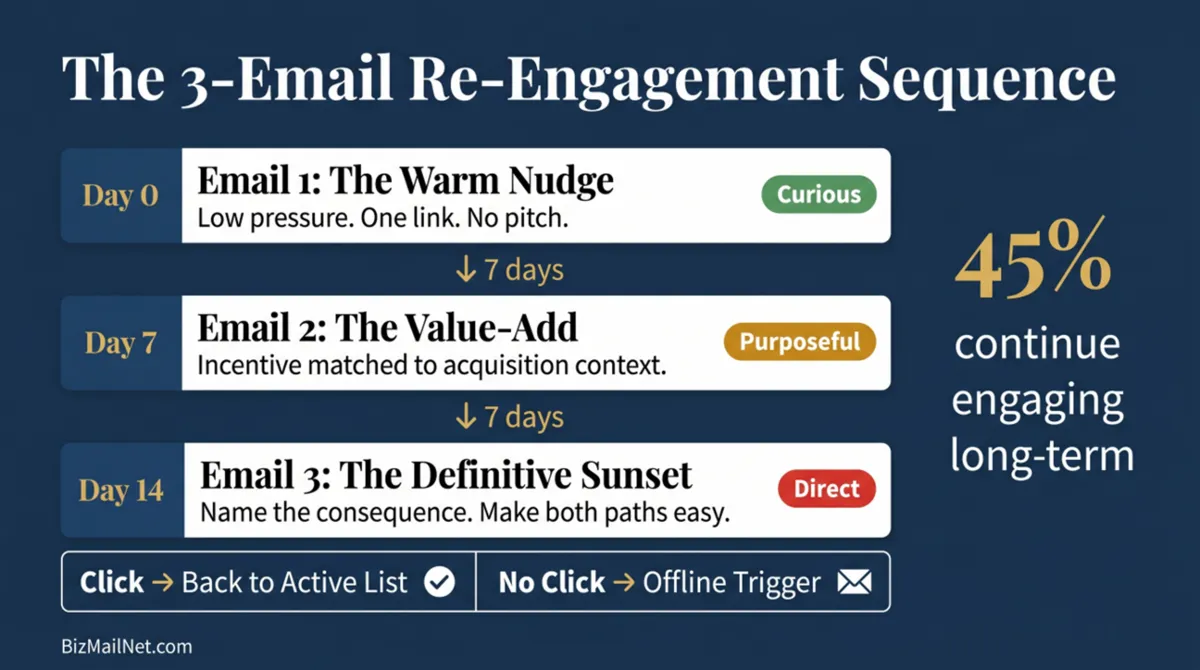
45% of subscribers who re-engage through a properly structured win-back sequence continue engaging with future emails long-term. Most marketing teams never reach that outcome because they send one generic email, get no response, and archive the segment. The gap between a failed re-engagement attempt and a successful one is almost always architecture, not copywriting.
Key Findings
- Multi-touch re-engagement sequences generate a 3x higher reply rate than single-email attempts. One email is not a sequence. It is a guess. (Cleverly, 2026)
- Top-performing reactivation sequences achieve click-through rates above 5%. Industry average open rates for well-structured campaigns run 20–25%. Open rate data is unreliable post-MPP. Measure CTR. (Prospeo, 2026)
- The apparel brand Slazenger documented 49X ROI over 8 weeks from an omnichannel re-engagement strategy combining email sequences with behavioral segmentation. (Insider, 2026)
- Contacts who fail the digital sequence are not lost. They are candidates for a direct mail trigger that bypasses the inbox entirely and reaches the physical desk.
Why Single-Email Win-Backs Fail
The standard re-engagement campaign runs like this: someone notices the list has a large unengaged segment, builds a quick "we miss you" email with a discount code, sends it to everyone who hasn't opened in six months, gets a 2% click rate, and concludes that the segment is dead. The segment is not dead. The approach is wrong.
A single email at the end of a long period of silence does almost nothing to overcome the inertia that caused the silence in the first place. The contact stopped engaging for a reason. That reason might be inbox overload, a change in role or company, a purchasing freeze, seasonal irrelevance, or simply being buried by the volume of commercial email they receive every week. A single message, no matter how well written, does not address any of those conditions. It just adds one more email to the pile.
The other structural problem with the single-email approach is format. The typical re-engagement email is built in the same branded HTML template as every other campaign. Large header image, navigation links in the footer, multiple CTAs, a designed layout that makes the inbox algorithm classify it immediately as a marketing broadcast. The format tells the recipient before they read a word that this is another promotional email from a sender they stopped paying attention to months ago.
Three emails over two to four weeks fixes both problems. The contact gets multiple chances to re-engage on their own timeline. The format shifts across the sequence (plain text nudge to value-add to direct last-chance), so each email reads and feels different from the one before it. And when the sequence ends with no click, you have a clean, factual basis for the suppression or deletion decision instead of a gut call made after one failed attempt.
The Post-MPP Measurement Problem: Stop Measuring Opens
Apple's Mail Privacy Protection (MPP), released in September 2021, changed what open rate data means in email marketing. When a recipient using Apple Mail opens the Mail app, iOS pre-fetches email content in the background, including the tracking pixel embedded in marketing emails. That pre-fetch registers as an open in the sending platform, regardless of whether the person actually read the email or even noticed it arrived.
By 2026, MPP has penetrated enough of the email client market that B2B lists with heavy Apple Mail usage can show open rate inflation of 20 to 40 percentage points above what humans actually opened. A campaign reporting 35% opens might be running at 15% real engagement, with 20 points of machine-triggered noise padding the number. There is no way to separate the two from inside a platform dashboard.
Re-engagement sequences are where this problem bites hardest. A team that calls a contact re-engaged because they "opened" an email may be counting a machine pre-fetch. That contact never looked at the email, gets moved back onto the active broadcast list, generates no clicks or conversions, and drags engagement rates down again within a month.
Click-through rate on a specific, trackable link in each email, plus downstream conversion events in GA4 or the CRM, is the measurement standard that actually tells you something. A contact who clicks has demonstrated deliberate human intent. A contact who only opens has demonstrated nothing you can rely on.
The measurement choice also changes what kind of email to send. Heavy HTML templates with large images can generate machine pre-fetches that inflate open counts. Plain-text emails with a single clear link produce no machine signals. They only register a click when a human actually clicks. If clicks are what you are measuring, plain text is the format that makes measurement accurate.
The 3-Email Sequence Architecture
Three emails. Each one does something different. The first acknowledges the gap without pressure. The second delivers something worth clicking for. The third names what happens next. The stakes escalate across the sequence because that escalation reflects what is actually happening: a relationship heading toward a clean endpoint if neither side takes action to preserve it.
Spacing matters as much as content. Emails deployed too close together feel like pressure. Emails too far apart let the momentum drop between sends. Five to ten days between each email, with the full sequence landing within two to four weeks, is the range that works across most business models.
Before the first email goes out, run the segment through a validation pass. Any contact who is now a hard bounce (changed jobs, deactivated account, expired domain) should be moved to suppression before the sequence starts. Sending a re-engagement sequence to addresses that cannot receive mail wastes send volume, generates bounce signals, and pollutes the sequence's click rate data with structural failures rather than genuine non-responses. The suppression workflow guide covers how to run this pass in Klaviyo, Mailchimp, Brevo, and ActiveCampaign before any bulk sequence is deployed.
Email 1: The Warm Nudge
The first email in the sequence does not ask for anything. It does not offer a discount or announce a new feature or try to close anything. Its job is to interrupt the inbox pattern that caused the contact to stop engaging, do it without inducing guilt or pressure, and leave one easy action available.
Format
Plain text or near-plain text. No large header image. No footer navigation. One link, one CTA. It should read like it came from a person, because in a meaningful sense it did. Someone on the marketing team noticed the contact had gone quiet and built a process to follow up. The plain format makes that feel true rather than manufactured.
Subject Line Frameworks
Subject lines that reference something specific about the contact perform better than generic formulations. If behavioral data is available (a previous download, a trial, a past purchase, a webinar registration), use it.
| Business Model | Subject Line Example | What Makes It Work |
|---|---|---|
| B2B SaaS | You tried [Product] in November | Specific to a prior action. Not a generic "we miss you." |
| E-commerce | Still thinking about [Category]? | References browse or purchase history without being invasive. |
| Agency / Services | Quick question about your [goal they expressed] | Feels like a personal follow-up from a human, not a broadcast. |
| Newsletter / Content | We haven't seen you since [Month] | Simple, direct, non-accusatory statement of fact. |
Body Copy Framework
Open with one sentence that names the situation without drama. Something like: "You haven't opened one of our emails in a while, and that's fine." Acknowledge the silence without making the contact feel guilty about it. Then give them one piece of genuinely useful content, a recent article, a data point, a resource they might have missed, with no gate and no form. End with one question or one low-friction CTA: "Was this useful? Let us know with a reply" or a single button linking to one piece of content.
The goal of Email 1 is a click or a reply, not a purchase. Success here is re-establishing that the contact is reachable and willing to engage. Everything downstream follows from that first small action.
Email 2: The Value-Add With Incentive
Email 2 arrives 5 to 10 days after Email 1, only to contacts who did not click anything in the first message. It escalates slightly in both tone and offer. Where Email 1 was a check-in, Email 2 is an explicit statement of value: here is something worth clicking for.
The Incentive Must Match the Acquisition Context
A B2B contact who originally signed up for a software comparison guide should receive a relevant resource or extended trial offer, not a 20% discount code. The discount signals that pricing is negotiable in ways that complicate future conversations, and more practically, it tells the contact that the marketing team has no memory of why they joined. That is exactly the wrong message when trying to revive a cold relationship.
Match the incentive to the original acquisition signal:
| Business Model | Appropriate Email 2 Incentive | Avoid |
|---|---|---|
| B2B SaaS | Extended trial, free audit, exclusive benchmark data, live demo access | Generic discount codes, feature list recaps |
| E-commerce | Percentage discount on the category they last browsed, free shipping threshold, early access to a sale | A discount on an unrelated category, a newsletter roundup |
| Agency / Services | Free 30-minute strategy session, a proprietary framework or template, a short case study relevant to their industry | Broad capabilities deck, pricing sheet |
| Newsletter / Content | Access to a premium archive, a curated "best of" package on a topic they engaged with previously, a community or Slack invite | Another standard newsletter issue, a general "here's what you missed" roundup |
Subject Line Frameworks for Email 2
Email 2 subject lines should acknowledge that the first email did not land and try a different angle. Avoid repeating the same approach. If Email 1 referenced something specific from the contact's history, Email 2 can lead with the incentive itself: "A free [resource] before we part ways" or "One more thing before we stop emailing you."
Format
Email 2 can be slightly more formatted than Email 1, but should not revert to a full branded HTML template. A short introduction paragraph followed by a clearly designed CTA button is the upper bound. The email should still feel personal and purposeful rather than like a campaign that was scheduled in advance and forgot to account for whether Email 1 generated a response.
Email 3: The Definitive Sunset
Email 3 goes to everyone who has not clicked in either of the first two messages, five to seven days after Email 2. The goal is simple: a clear choice and an honest statement of what happens if they do not make one.
Keep it short and direct: "This is the last email we will send before removing you from our list. Click below to stay, or do nothing and we will remove you in [X] days." Two options, both easy. Making it hard to unsubscribe from Email 3 generates spam complaints. Making both options equally frictionless lets the contact decide with no resentment in either direction.
Subject Line Frameworks for Email 3
Email 3 subject lines need to be the most direct of the three. The contact has seen two previous emails and not clicked either. Soft subject lines will not break through. "Last email before we remove you," "Staying or going?" and "We're about to remove you from our list" all work well because they say exactly what is happening. They feel abrupt out of context. In a re-engagement sequence, that directness is the point.
The Unsubscribe Path as a Positive Outcome
Many marketing teams panic when Email 3 generates a spike in unsubscribes. Those contacts were generating a low-engagement signal with every non-open across every prior campaign. Them leaving voluntarily is better than them staying silently and dragging down domain reputation every time a send goes out. The list is smaller. The list is cleaner. Both of those things are good.
Contacts who click the "stay subscribed" CTA in Email 3 are worth noting. They saw two previous emails, did not click either, nearly got removed, then made a deliberate choice to stay. That kind of considered opt-in is a stronger engagement signal than a passive subscriber who has been on the list for years and never takes action. Move them back to the active list and restart their engagement clock at zero.
Timing Windows and Spacing
Complete the sequence within two to four weeks from the first send. Less than two weeks and the contact feels pressured before they have had a real chance to engage at their own pace. More than four weeks and the later emails arrive with no connection to the earlier ones. The momentum is gone and Email 3 reads as if it came out of nowhere.
Recommended spacing for most business models:
| Send Timing | Notes | |
|---|---|---|
| Email 1 (Warm Nudge) | Day 0 | Run validation pass on the segment before this send. Remove all hard bounces first. |
| Email 2 (Value-Add) | Day 7 | Send only to non-clickers from Email 1. Clickers move back to the active list. |
| Email 3 (Sunset) | Day 14 | Send only to non-clickers from Email 2. Name the removal consequence explicitly. |
| Post-sequence action | Day 21 | Non-clickers from Email 3 move to permanent suppression. Flag physical addresses for offline trigger. |
Send day of week matters for B2B contacts. Tuesday, Wednesday, and Thursday mornings consistently produce higher CTRs in B2B email contexts than Monday (inbox clearing day) or Friday (wind-down before weekend). For B2C e-commerce contacts, Thursday through Sunday performs better because purchase decisions happen closer to weekend leisure time. Adjust the starting day of the sequence to align with the behavioral patterns of your specific audience.
One operational detail that is frequently missed: the automation that moves non-clickers to the next email must check click status across all prior emails in the sequence, not just the most recent one. A contact who clicked Email 1 but was accidentally included in the Email 2 send should not receive Email 3. Build the suppression logic per email step, not just at the sequence level.
The Offline Trigger: What Happens After the Final Email
When a contact completes the full sequence without clicking anything, two paths apply. The first is permanent suppression from digital sends. The second, for contacts with physical address data available, is a direct mail trigger before any permanent removal decision.
A contact who did not respond to three emails over three weeks has told you the inbox is not the right channel right now. That says nothing about whether they would respond to a postcard. The inbox is noisy, filtered, and subject to algorithmic routing. A physical piece arrives on a desk without any of those barriers.
On Day 21, after Email 3 has gone out and the non-click window has passed, export the non-responder segment. Check each record for a physical address. For records without one on file, request address appending through a direct mail vendor (Taradel, PostcardMania, and Lob all offer this). For records where a physical address is available or can be appended, queue a postcard or catalog for delivery approximately 5 to 7 days after the email sequence ended.
The physical piece should reference the brand clearly without repeating the re-engagement framing from the emails. The contact has already seen three digital re-engagement messages. The physical piece is a new touchpoint, not a fourth attempt at the same approach. Lead with product or service value rather than "we've been trying to reach you." Include a trackable URL (a vanity URL or QR code routed through a campaign-specific landing page) so that any resulting website visit can be tied back to the direct mail piece in GA4.
Keep the suppressed digital segment intact for 60 days after the physical piece goes out. Any contact who visits the site through the trackable URL during that window is a reactivated contact for attribution purposes, even if they never clicked a re-engagement email. After 60 days with no response across both channels, archive or delete the record with a full audit trail of the attempts made.
Reviews of the vendors that handle triggered direct mail at SMB scale are in the direct mail vendor directory. The full list hygiene context for this workflow, including how to run the validation pass before the sequence starts, is covered in the suppression workflow guide.
Sequence Template Builder
Select your business model below. The builder outputs a customizable 3-email copy framework with subject line variants, body copy starting points, CTAs, and recommended spacing for your vertical.
FAQ
The evidence-backed standard is 3 emails deployed over 2 to 4 weeks. Fewer than 3 does not give the contact enough opportunities to re-engage at their own pace. More than 3 risks generating spam complaints from contacts who are genuinely done and would have unsubscribed if given a clearer final option. The 3-email structure maps to a logical arc: a warm acknowledgment, a value-add with incentive, and a definitive last-chance notice with a clear unsubscribe path.
Click-through rate and downstream conversion events are the only reliable metrics for re-engagement sequences in 2026. Apple Mail Privacy Protection causes machine pre-fetching of email content that registers as an open without a human viewing the message. Open rate data from any sequence sent to Apple Mail users is inflated by an unknown proportion. A contact counted as re-engaged based on an open may never have seen the email. CTR and conversion events confirm that a human took a deliberate action.
Subject lines that reference something specific about the contact's prior behavior outperform generic formulations. Examples: "You downloaded our pricing guide in March" or "Your trial ended 4 months ago." For the final sunset email, direct subject lines that name the consequence perform best: "Last email before we remove you" or "Staying or going?" Avoid subject lines that open with a first name alone, which reads as a template signal in 2026 inboxes.
Plain text or minimal HTML outperforms heavily designed templates in re-engagement contexts. A richly branded email with large images and multiple CTAs signals a marketing broadcast to both the recipient and the spam filter. The re-engagement context calls for something that reads as a direct personal message. No large header images, no footer navigation, one clear CTA, and paragraph-style copy rather than bullet lists or designed sections. The format shift alone often interrupts the inbox pattern that caused the contact to stop engaging.
Move them to permanent suppression for digital sends. For contacts with physical address data available, the failure of the digital sequence is the trigger for a direct mail follow-up: a postcard or catalog sent to the physical address. The physical channel is unaffected by inbox algorithms and the contact's prior brand awareness makes conversion probability higher than a cold direct mail send. Contacts who produce no response across both channels after a 60-day post-mail window are candidates for permanent archive.
Sources
- Prospeo. Email Marketing Rules: Legal and Technical Guide. 2026. prospeo.io (vendor source)
- Cleverly. Email Sequence Strategy to 3x Your Replies in 2026. 2026. cleverly.co (vendor source)
- Reddit. r/Emailmarketing. Do you recommend removing inactive subscribers from a list? 2026. reddit.com (anecdotal)