UTM Parameters for Email: Tracking Every Campaign Touch
A marketing team spends three weeks building a campaign. The emails go out. Clicks come in. GA4 shows no email traffic. The revenue that did happen is sitting in the Direct bucket, credited to nothing. One wrong character in a UTM string makes a successful campaign invisible to every downstream report.
Key Findings
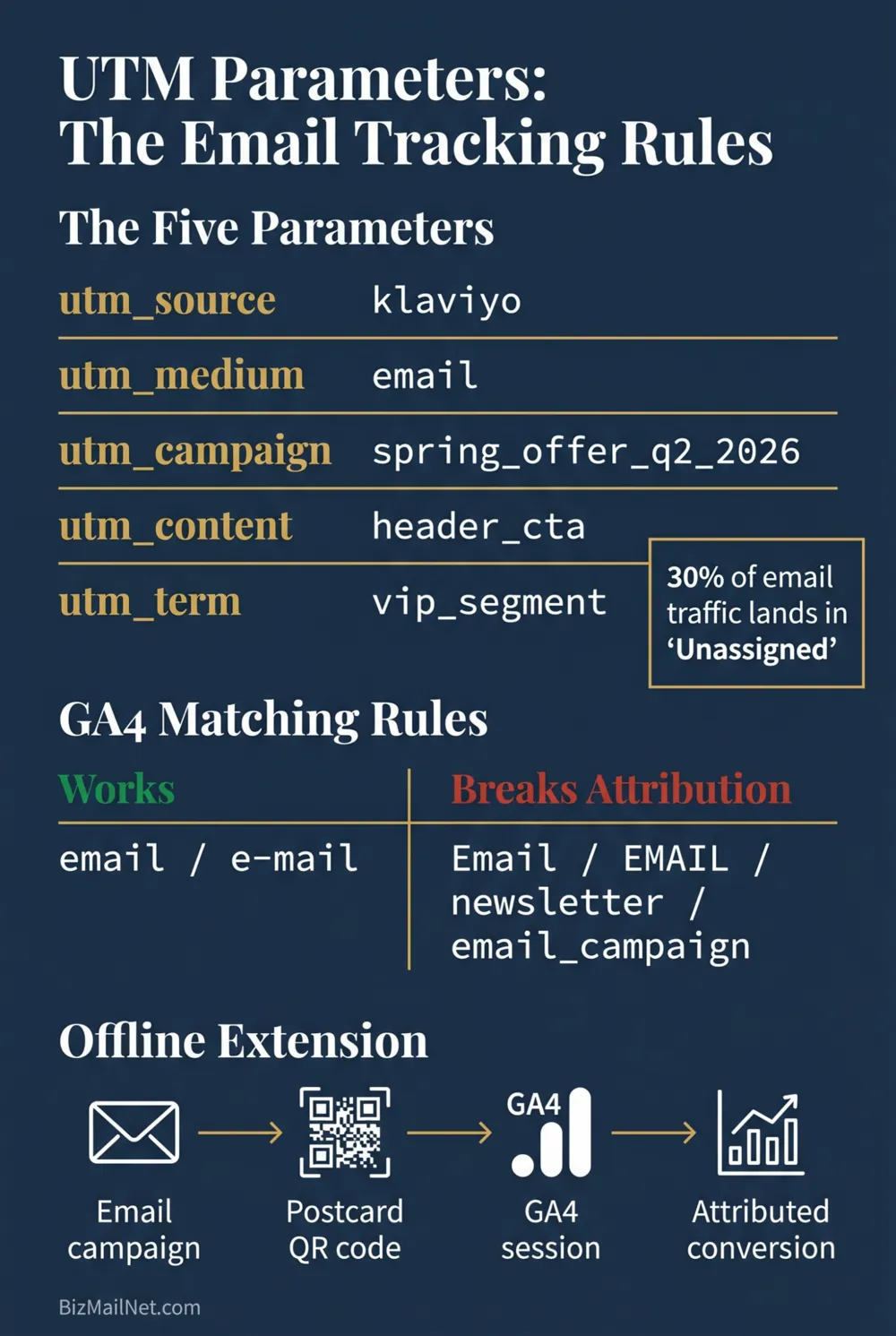
- Up to 30% of a company's web traffic ends up in GA4's Unassigned bucket due to UTM syntax errors. One capital letter, one hyphen, or a space instead of an underscore is enough to lose attribution on an entire campaign. (Digital Applied, 2026)
- GA4 maps sessions to default channels using exact string matching on utm_medium. The string "email" works. "Email," "e-mail," and "newsletter" all fall to Unassigned. There is no fuzzy matching and no fallback. (Digital Applied, 2026)
- Adding manual UTMs to Google Ads URLs overrides auto-tagging and strips cost-per-click data from GA4. This single mistake corrupts paid search attribution for every campaign it touches.
- UTM parameters extend directly to offline channels. A QR code on a direct mail postcard with a properly formatted UTM produces a trackable GA4 session, closing the attribution gap between physical mail spend and digital conversion data.
Why 30% of Email Traffic Goes Unassigned in GA4
The Unassigned channel in GA4 is not a technical glitch. It is a symptom of tracking infrastructure that was never governed correctly. GA4 assigns sessions to default channels by checking the utm_source and utm_medium values against a hard-coded list of accepted strings. If the values match, the session goes to the right channel. If they do not match exactly, the session gets pushed to Unassigned or Other, where it becomes invisible to channel-level reporting and attribution modeling.
The most common scenario: a marketing ops team runs a large email campaign and watches click data in the platform. Clicks are strong. GA4 shows no corresponding spike in email-channel traffic. An hour of investigation turns up the culprit: whoever built the UTM links typed utm_medium=Email instead of utm_medium=email. One capital letter. Every session from that campaign went to Unassigned. The revenue attributed to "direct" traffic that week includes every conversion from an email click that GA4 could not categorize.
This is not an edge case. Analytics managers in practitioner communities describe spending hours auditing UTM parameters only to discover a slight variation in a medium tag that a team member typed manually into a campaign builder. The Digital Applied research team puts it plainly: in the domain of tracking, consistency beats cleverness. A governance system that prevents the wrong string from ever being typed is more valuable than any amount of post-hoc auditing.
The full attribution picture for email, including how GA4 attribution interacts with platform-reported conversions, is in the email marketing ROI measurement guide.
The Five UTM Parameters and What Each One Does
UTM parameters are text tags appended to destination URLs. When a user clicks a tagged link, the parameters pass into GA4 and tell it exactly where the session originated. There are five parameters. Three are required for email attribution. Two are optional but useful for creative testing.
utm_source
Identifies the specific origin of the traffic. For email campaigns, this is typically the name of the sending platform or the list that received the send. Examples: klaviyo, mailchimp, newsletter_list, weekly_digest. The source should be specific enough to distinguish between different lists or sending contexts if you operate more than one. A company with a customer newsletter and a prospect nurture sequence needs different source values so GA4 can tell them apart.
utm_medium
Identifies the marketing channel. For email, this must be email exactly. This is the parameter that maps to GA4's default Email channel grouping. Any variation fails the match and loses attribution. Do not use: Email, e-mail, newsletter, EMAIL, email-campaign. Use only: email.
utm_campaign
Names the specific campaign or send. This is where teams have the most flexibility, but also the most room for inconsistency. The best practice: lowercase, underscores instead of spaces, and versioning with a date or quarter. spring_sale_2026 is correct. Spring Sale, spring-sale, and spring_sale (without a year) all create separate line items in GA4 that look like different campaigns, and if the same campaign name is used across multiple years without versioning, the historical data merges into a single corrupted row.
utm_content
Optional. Distinguishes between different links within the same email when multiple CTAs appear in one send. If an email contains a header button, a mid-body text link, and a footer button all pointing to the same destination, tagging each with a different content value shows which placement drove the click. Examples: header_cta, body_link, footer_btn. Useful for creative testing at the link level without running a full A/B test.
utm_term
Optional. Originally designed for paid search keyword tracking. In an email context, it is occasionally used to tag the audience segment that received the send. Example: utm_term=vip_segment or utm_term=30day_inactive. Not a standard email use case but a reasonable extension when granular segment-level attribution is needed without building separate campaigns for each audience.
GA4 Channel Grouping Rules: The Exact Strings That Work
GA4 assigns sessions to default channels through a rules engine that checks utm_source and utm_medium against a fixed list. The engine does not approximate, infer, or accept variations. If the string does not match exactly, the session falls through to Other or Unassigned.
For the Email default channel, GA4 requires that utm_medium matches the regex pattern: email|e-mail. In practice, email is the correct value. The hyphenated variant technically matches the regex but is not the industry convention and creates inconsistency. Use email only.
| utm_medium value | GA4 Default Channel | Status |
|---|---|---|
email | Correct | |
Email | Unassigned | Wrong: capital E breaks the match |
newsletter | Unassigned | Wrong: not in GA4's accepted list |
e-mail | Technically matches regex. Use email instead. | |
EMAIL | Unassigned | Wrong: uppercase fails regex match |
email_campaign | Unassigned | Wrong: suffix breaks the exact match |
cpc | Paid Search | For paid ads only. Never use for email. |
direct_mail | Unassigned (default) or Custom channel | Use for offline. Requires a custom GA4 channel grouping rule. |
The direct_mail row is worth specific attention. GA4 has no built-in channel for direct mail, so UTM-tagged physical mail sessions fall to Unassigned by default. To fix this, create a custom channel grouping in GA4 under Admin, Data Display, Channel Groups, and add a rule that matches utm_medium exactly equals direct_mail. This surfaces physical mail traffic in its own channel row rather than burying it in Unassigned alongside broken email tags.
To check your current state: open GA4, go to Reports, Acquisition, Traffic Acquisition. Change the primary dimension to Session medium. Look for any row labeled Unassigned or Other that has meaningful session volume. Any session sitting there represents attribution that was lost to a tagging error. The medium values in those rows will show exactly what strings were used and did not match.
Building a UTM Governance Document
Every team that uses UTM parameters needs a governance document. A governance document is not a style guide or a suggestion. It is the mandatory reference that every person who creates a campaign link is required to use, and it is the source of truth that the team refers to during audits when attribution breaks.
Without governance, UTM data fragments within 60 days. One team member uses underscores. Another uses hyphens. One capitalises the source name. Another does not. Each variation creates a separate line in GA4 that looks like a different campaign, and the actual performance of any individual send becomes impossible to read because its data is split across three or four rows with slightly different labels.
What the Document Must Contain
Approved source values: A complete list of every utm_source value the team is permitted to use, with a plain-English description of when each one applies. Example list:
klaviyo: all sends from the Klaviyo platformmailchimp: all sends from the Mailchimp platformhubspot: all sends from HubSpot marketing emailspostcard: direct mail postcard piecescatalog: direct mail catalog pieces
Approved medium values: Typically a short list. email for all email sends. direct_mail for physical pieces. sms for text message campaigns. social for organic social. Nothing else.
Campaign naming convention: Lowercase. Underscores between words. Date or quarter suffix. Format: [campaign_name]_[quarter_year]. Example: welcome_series_q2_2026. The date suffix prevents years of data from merging into a single row when the same campaign name is reused.
Who owns it: One person is responsible for maintaining the document and approving additions to the source and medium lists. New values cannot be created unilaterally by individual team members. All additions go through that owner.
Where campaign links are generated: All campaign links are built through a single approved URL builder. No manually typed UTM strings in email builders. No copying a previous campaign's link and editing it by hand. One builder, one output, one place the link comes from.
The Digital Applied research team is direct about the operational requirement: consistency beats cleverness. A team with a shared taxonomy document and a single builder will produce clean, auditable data for the life of the program. A team without one will spend recurring hours auditing broken reports.
Five Mistakes That Break Attribution
1. Capital Letters in Parameter Values
GA4's string matching is case-sensitive. email works. Email does not match. This is the most common error because it is invisible to the person making it. The link still works, the email still sends, and the clicks still arrive. The failure only appears later when someone opens GA4 and cannot find the campaign data.
2. Spaces Instead of Underscores
Spaces in UTM parameter values get URL-encoded as %20, which creates a different string than intended and often breaks GA4's matching logic. spring sale becomes spring%20sale in the URL, which does not match any campaign grouping rule. Use underscores throughout. Every space in a UTM value is a potential attribution failure.
3. UTMs on Internal Navigation Links
Placing UTM parameters on links within your own website is one of the most damaging tagging errors in analytics. When a user clicks an internally UTM-tagged link, GA4 treats it as a new session from whatever source and medium the tag specifies. The original acquisition source, the email click that brought the user to the site, gets overwritten. The session is now attributed to whatever the internal link's UTM says, not to the email campaign that drove the visit. Never tag internal links. UTMs belong only on links in external communications: emails, ads, social posts, and direct mail pieces.
4. Adding Manual UTMs to Google Ads URLs
Google Ads uses auto-tagging (the gclid parameter) to pass attribution data into GA4 automatically. Adding manual UTM parameters to Google Ads destination URLs overrides the gclid and strips the cost-per-click data that normally flows into GA4 through the Google Ads account link. The result: paid search traffic is attributed based on manually typed UTM values, and GA4 loses all cost data for those clicks. If you use Google Ads, let auto-tagging run on its own and do not add manual UTMs to paid search destination URLs.
5. Unsupported Medium Values
Teams sometimes create descriptive medium values that feel intuitive but do not match GA4's accepted channel list. Values like promo_email, drip, nurture, transactional, and triggered are all technically valid UTM strings but do not map to any GA4 default channel. Every session tagged with an unsupported medium value goes to Unassigned. The fix is to map all email sends to email and use utm_campaign and utm_source to distinguish between send types, rather than encoding type information in the medium value.
UTM Parameters for Direct Mail and Offline Channels
UTMs are not a digital-only mechanism. Any channel where you can control the destination URL that a contact visits can be tracked with UTM parameters. Direct mail is the primary offline application, and when set up correctly, it turns a physical postcard or catalog into a trackable digital session in GA4.
The setup works through redirection. The direct mail piece displays either a QR code or a short vanity URL. Both point to an intermediate redirect that appends the UTM parameters before sending the visitor to the final destination. The contact sees a clean URL on the physical piece. GA4 receives the full tagged URL when they arrive on the site.
Correct UTM Structure for Direct Mail
The destination URL for a direct mail postcard in Q2 2026 might look like:
https://example.com/landing?utm_source=postcard&utm_medium=direct_mail&utm_campaign=spring_offer_q2_2026&utm_content=front_panel_qr
Breaking down each value:
utm_source=postcard: identifies the specific piece type. Usecatalog,letter, orpackage_insertfor other formats.utm_medium=direct_mail: identifies the channel. Requires a custom GA4 channel grouping rule to surface in its own row rather than Unassigned.utm_campaign=spring_offer_q2_2026: names the campaign with the standard date suffix convention.utm_content=front_panel_qr: distinguishes this QR code from others on the same piece if multiple tracking codes are present.
When a recipient scans the QR code or types the vanity URL, GA4 sees an inbound session from direct_mail / postcard with the campaign name spring_offer_q2_2026. Any conversion that follows in the same session, or within the GA4 attribution window, gets credited to that direct mail campaign. This is how physical mail becomes a measurable, attributable channel in the same reporting interface as email, paid search, and organic social.
The vendors that handle triggered direct mail with trackable QR codes and vanity URL infrastructure at SMB scale are reviewed in the direct mail follow-up directory.
UTM Parameter Builder
Enter your campaign details. The builder enforces lowercase, converts spaces to underscores, and flags any medium value that does not map to a GA4 default channel. Copy the output URL directly into your email builder or QR code generator.
FAQ
Use utm_medium=email exactly, in lowercase, with no variation. GA4's default channel grouping engine maps the string email to the Email channel. Variations including Email (capital E), e-mail, newsletter, or EMAIL all fail to match and push the session to Unassigned. Check your current traffic in GA4 under Acquisition, Traffic Acquisition, filtered by Session medium to see whether any historical email sessions are currently misclassified.
Yes, every external link pointing to your website needs a UTM. Untagged links produce sessions that GA4 classifies as direct or organic, losing the email attribution entirely. The exception is links to third-party domains where you do not own the analytics. Internal links within your own website should never have UTMs. Adding UTMs to internal navigation overwrites the original acquisition source for that session and permanently breaks the attribution record for that visit.
Adding manual UTMs to Google Ads destination URLs overrides Google's auto-tagging (gclid) and strips cost-per-click data from GA4. The session gets attributed based on your manually typed values instead of Google's automatic tagging, and the cost data that normally flows through the Google Ads account link is lost entirely. If you use Google Ads, let auto-tagging handle paid search attribution. Manual UTMs on Google Ads URLs are one of the most damaging tracking mistakes in paid search operations.
Direct mail pieces use UTM-tagged destination URLs delivered via a QR code or vanity URL redirect. A postcard displays a short URL that redirects to the full tagged destination, such as example.com/landing?utm_medium=direct_mail&utm_source=postcard&utm_campaign=spring_2026. When the recipient scans or types the URL, GA4 records the session as a direct mail visit. Pair this with a custom GA4 channel grouping rule for direct_mail medium so the sessions surface in their own channel row rather than Unassigned.
Yes. Your email platform uses its own click tracking on links inside the email, recording who clicked what within the platform. GA4 reads the UTM parameters when the destination page loads and records the session source, medium, and campaign. Platform data is useful for comparing campaigns against each other and measuring email engagement. GA4 data is useful for attributing conversions and measuring what happened after the click. Both exist without conflict as long as the UTM parameters are correctly formatted.
Sources
- Digital Applied. UTM Parameters: GA4 Channel Grouping and Tracking Standards. 2026. digitalapplied.com (vendor source)
- Magiclogix. How to Use UTM Parameters to Master Campaign Tracking. 2026. magiclogix.com
- Northbeam. UTM Tracking 101: Campaign Attribution Guide. 2026. northbeam.io
- Cometly. Offline Tracking with UTM Parameters: Print and Direct Mail. 2026. cometly.com